Core Cloud Backup Recovery Architecture and Restoration Methods
Modern IT environments rely on multi-tier restoration architectures designed to protect endpoints, servers, and hypervisors. When downtime strikes, our priority as an experienced IT Provider is achieving an acceptable Recovery Point Objective (RPO) and Recovery Time Objective (RTO). RPO measures how much data an organization can afford to lose between backup intervals, while RTO defines the target window for getting systems operational again.
Cloud recovery workflows depend heavily on whether data must be retrieved as complete system volumes or individual objects. Comprehensive data backup recovery plans balance speed, storage overhead, and network throughput. When recovering a workload, administrators can execute block-level imaging or file-level extraction depending on operational urgency. For instance, teams can Restore a file system to the source host to overwrite corrupted system partitions or roll back changed blocks while leaving untargeted directories intact.
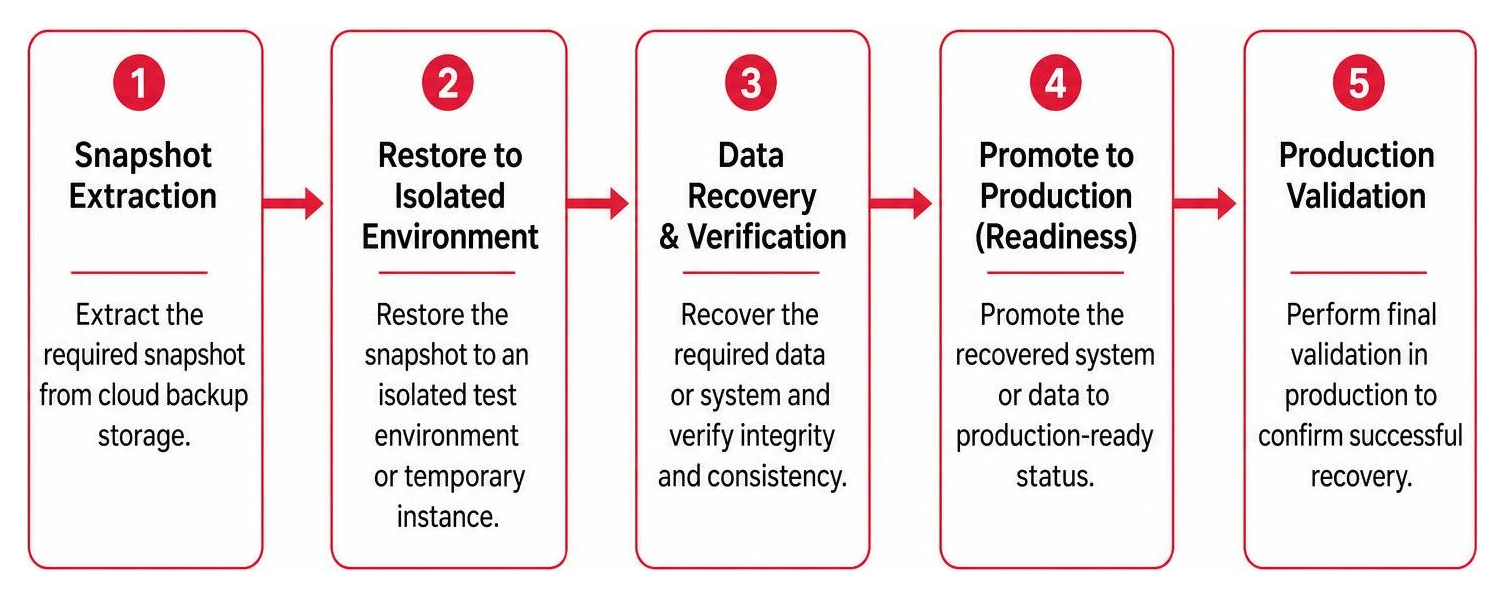
Full System Versus Granular File-Level Recovery
Choosing the right restore type directly impacts business downtime. A bare-metal restore rebuilds entire operating systems, drivers, and configurations from scratch onto fresh physical hardware or newly provisioned virtual machine instances. In cloud environments, persistent disk snapshots allow organizations to restore multi-terabyte virtual servers in minutes. In fact, enterprise deployments protecting more than 250TB of mission-critical database workloads have achieved a reduction in full backup duration from several hours down to just 15 minutes by leveraging native cloud snapshots.
Granular file-level recovery, by contrast, retrieves individual spreadsheets, mailboxes, or database records without re-imaging the underlying operating system. The integrity of these restores depends on backup consistency:
- Crash-Consistent Backups: Capture data as it existed on disk at an exact second, similar to pulling the power plug. They are suitable for static file servers but may require manual log replays for active databases.
- Application-Consistent Backups: Coordinate with underlying services via Volume Shadow Copy Service (VSS) or database freeze commands to flush pending I/O operations from memory to disk. This ensures clean database recovery without corruption.
Before completing a production cutover, rigorous data integrity verification validates file checksums to ensure that restored databases and virtual machine disks boot and operate without hidden anomalies.
Essential Steps for Cloud Backup Recovery After System Failure
When local hardware suffers a catastrophic failure, a disciplined recovery process prevents secondary data loss. Knowing data recovery 101 what to do when disaster strikes helps teams systematically bring infrastructure back online:
- Verify Cloud Repository Authentication: Access the cloud management console through secure web sessions or APIs to verify available point-in-time recovery points.
- Locate Missing Backups: If recent snapshots seem unavailable, inspect retention rules, secondary storage vaults, or tenant access logs to ensure the correct tenant subscription is targeted.
- Provision Target Infrastructure: Deploy replacement physical endpoints, virtual machines, or cloud compute instances matching required CPU, memory, and networking specifications.
- Synchronize Credentials and Access: Re-authenticate service accounts, update rotating SMB/NFS credentials if passwords changed after the backup was captured, and confirm directory permissions.
- Execute Restoration: Initiate the file-level or volume-level recovery stream, monitoring transfer rates and network stability until completion.
- Reactivate Endpoint Licenses: Re-link digital application licenses through central cloud account management portals so users can immediately resume productivity.
Cyber Resilience and Ransomware Defense in Backup Infrastructure
Modern cyber threats deliberately seek out and compromise backup catalogs before encrypting production environments. Securing IT infrastructure requires adopting zero-trust principles and understanding proven 7 ways to avoid ransomware in your business. Cloud backup infrastructure must stand as an isolated, resilient safety net rather than an accessible network share.
Integrating continuous threat detection, strict multi-factor authentication (MFA), and centralized role-based access control stops unauthorized actors from modifying backup schedules. Solutions like Backup and DR Service | Google Cloud provide policy enforcement frameworks that protect enterprise snapshots across distributed projects. Coupled with understanding how network security services protect against modern cyber threats, an enterprise gains defensive depth by safeguarding both live workloads and secondary data repositories.
Mitigating Ransomware with Secure Cloud Backup Recovery Vaults
A primary defense against targeted extortion is immutable storage. Cloud backup vaults enforce Write-Once-Read-Many (WORM) policies and indelibility settings, ensuring that once a backup point is written, it cannot be modified, overwritten, or deleted by any user—including root administrators—until the retention timer expires.
This architecture neutralizes attacks where adversaries attempt to wipe backup repositories after gaining privileged credentials. By pairing strict retention locks with proactive controls to stop the leaks with better web data loss prevention, organizations guarantee that an uncorrupted, pristine version of their data remains available for emergency rollback.
Isolated Recovery Environments and Clean Data Validation
Restoring compromised systems directly into production is risky, as dormant ransomware or persistent backdoors might reinfect clean networks. An Isolated Recovery Environment (IRE) provides a sandboxed, out-of-band cloud network where restored images can be inspected before cutover.

Within the IRE, automated security tools perform malware scanning, integrity checks, and behavioral analysis on restored virtual machines and databases. Combining sandbox quarantine with proactive security measures, such as knowing why penetration testing cloud services is your new best friend, ensures that organizations validate the health of their recovery images, identify initial infection vectors, and restore operations with confidence.
Comparing Cloud Backup Recovery Solutions: Enterprise Evaluation Criteria
Selecting an enterprise backup platform requires balancing performance, cost, and governance. Organizations must analyze how storage tiers, API fees, and bandwidth impact overall expenses and recovery capabilities.
| Evaluation Criterion | Core Consideration | Impact on Recovery & TCO |
|---|---|---|
| Storage Tiering | Hot object vs. Cold archive storage | Cold storage reduces retention costs but incurs higher retrieval fees and delays. |
| Data Egress Fees | Per-gigabyte network egress charges | High egress costs from hyperscalers can make mass disaster recovery expensive. |
| Immutability & Vaulting | WORM policies and indelible locks | Prevents malicious tampering and ransomware deletion of recovery points. |
| Recovery Speed & RTO | Network bandwidth limits and snapshot integration | Determines whether system recovery takes minutes or several days. |
| Application Awareness | VSS integrations, database freeze capabilities | Ensures consistent recovery of active transactional databases. |
| Compliance & Localization | SOC 2, HIPAA, multi-region residency | Satisfies regulatory requirements for geographic data placement and audit logging. |
Total Cost of Ownership, Egress Fees, and Storage Tiers
Evaluating total cost of ownership (TCO) extends beyond the base price per terabyte. Hyperscale public clouds often charge low monthly storage rates for cold tiers but apply high fees for data egress and API read requests during a full recovery. Conversely, specialized object storage providers may offer flat-rate pricing without egress fees, making mass recoveries predictable.
Balancing cold archives for multi-year regulatory retention with hot tiers for daily operational recovery protects budgets. Recognizing 4 surprising ways the cloud reduces costs in your business helps leaders optimize cloud storage tiers while avoiding costly billing surprises during emergency restores.
Bandwidth Bottlenecks and Hybrid 3-2-1 Backup Integration
Relying exclusively on off-site cloud storage introduces real-world network bottlenecks. Downloading a 2TB database or virtual machine over a standard corporate internet connection can take days. When comparing cloud vs local server recovery speeds, local infrastructure provides near-instantaneous file access, whereas the cloud offers resilience against local hardware destruction.
To solve this, organizations deploy the classic 3-2-1 backup strategy:
- Keep 3 copies of critical data.
- Store backups on 2 different media types (such as local disk/NAS and cloud object storage).
- Maintain 1 copy completely off-site in an immutable cloud vault.
Implementing a hybrid design with local appliances provides fast on-site recovery for daily mishaps, while off-site cloud snapshots ensure full disaster recovery if the physical facility is compromised. Reviewing best practices server backup data protection guarantees your hybrid architecture maintains fast RTOs without saturating WAN bandwidth.
SaaS Data Protection for Microsoft 365 and Cloud Workloads
A common cloud myth is that SaaS providers automatically back up user data. While platforms like Microsoft 365 and Google Workspace ensure high availability and infrastructure uptime, their native retention tools do not protect against accidental deletion, malicious internal actions, or account hijacking.
Deploying dedicated third-party SaaS backup tools is necessary for complete operational resilience. Implementing professional data backup solutions essential for business ensures that productivity data across mailboxes, shared drives, and collaboration tools is protected under an independent retention policy.
Mailbox, File Share, and Workspace Point-in-Time Restores
Specialized SaaS backup solutions capture email boxes, OneDrive folders, SharePoint sites, and Google Workspace environments with full point-in-time version history. Administrators can execute granular restores to recover a single lost spreadsheet, a corrupted calendar folder, or an entire departed employee’s mailbox into an active user’s account.
These tools preserve critical metadata, inherited folder permissions, and document sharing settings. If a user’s cloud drive is compromised by ransomware, administrators can roll back the entire directory structure to a clean state captured before the infection. Incorporating automated SaaS protection into your disaster recovery business continuity plan eliminates gaps between internal infrastructure and cloud-hosted collaboration platforms.
Frequently Asked Questions About Cloud Backup and Recovery
What is the difference between crash-consistent and application-consistent backups?
Crash-consistent backups capture disk contents at an exact instant in time without notifying running applications. While adequate for non-database file storage, active transactional applications (like Microsoft SQL Server or Oracle) may have data stored in volatile memory that was not written to disk. Application-consistent backups communicate with the operating system using VSS writers or database freeze commands to commit memory transactions and flush logs before capturing the snapshot, guaranteeing clean data recovery without corruption.
Why is relying solely on the cloud insufficient for enterprise disaster recovery?
Relying entirely on a pure-cloud backup strategy exposes organizations to network bandwidth limitations and internet outages. Downloading multi-terabyte system images or large database files over a WAN connection can take days, leading to extended business interruption. A hybrid 3-2-1 architecture—pairing fast on-premises backup targets with off-site cloud replication—delivers the rapid recovery times of local storage alongside the geographic safety of the cloud.
How do backup vaults prevent early deletion during a cyberattack?
Backup vaults implement immutable storage and Write-Once-Read-Many (WORM) compliance locks. When configured, retention timers prevent any user, API call, or compromised administrator account from altering, overwriting, or deleting backup points until the defined retention period expires. This ensures uncorrupted data copies remain safe and available for recovery even if internal administrative credentials become compromised.
Conclusion
Building a robust cyber resilience roadmap requires combining multi-tiered backup architectures, strict storage immutability, and regular recovery validation. True business continuity is achieved not simply by copying data to the cloud, but by verifying that systems, applications, and cloud workloads can be restored swiftly and securely when disruptions occur.
Alliance InfoSystems provides flexible, customized, and cost-efficient IT solutions with over 20 years of experience serving organizations across Maryland. As an experienced IT Provider specializing in managed security, cybersecurity, cloud migration, and data protection, we help organizations design, implement, and validate dependable cloud backup recovery architectures tailored to their operational needs.