
The Real Cost of Ignoring Data Loss Prevention in 2026
Data loss prevention is a set of tools, processes, and policies designed to stop sensitive information from being shared, transferred, or accessed without authorization.
In practical terms, DLP monitors and protects sensitive data across your network, devices, and cloud apps. It helps safeguard customer PII, financial records, intellectual property, and employee data by using AI, pattern matching, and policy rules to detect risky activity before it turns into a breach. That protection matters because the average data breach now costs organizations USD 4.88 million, and any business that stores, processes, or transmits sensitive data needs a plan to reduce that exposure.
Data is one of the most valuable assets a business owns. It is also one of the most exposed. Every day, hundreds of employees access, move, and share sensitive files across devices, email, cloud storage, and collaboration tools. Most of the time, nothing goes wrong. But it only takes one mistake, one malicious actor, or one misconfigured setting to trigger a breach that costs millions and damages your reputation for years.
The threat landscape in 2026 is more complex than ever. Remote and hybrid workers now make up a growing share of the workforce. Generative AI tools are being used daily, often without oversight. Shadow data sitting in unsanctioned apps creates blind spots that security teams struggle to address. Nearly half of all breaches involve customer personally identifiable information, and 43% involve intellectual property records.
For small and mid-sized businesses, the stakes are just as high as for large enterprises, but the resources to respond are often much smaller. That is exactly why having a clear, structured approach to data loss prevention matters.
This guide walks you through everything you need to know: how DLP works, the different types of solutions available, why your organization needs a strategy in place now, and how to implement one without disrupting your operations.
Understanding the Mechanics of Data Loss Prevention
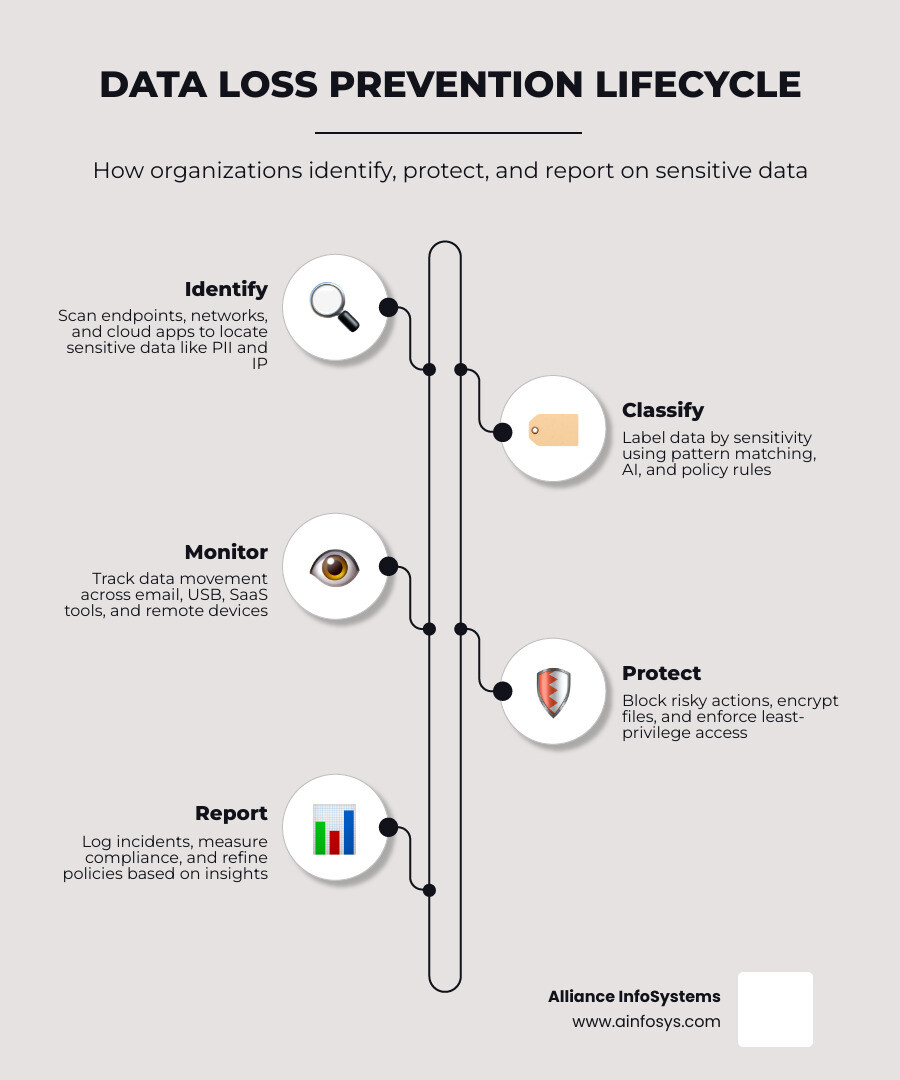
At its core, data loss prevention works by finding sensitive data, understanding its context, and applying rules to control what users can do with it. Good DLP is not just a wall that says “no.” It is a system that watches how data moves and helps prevent unsafe sharing before it becomes a breach.
Most platforms follow the same basic flow. They identify sensitive data, classify it by type and sensitivity, monitor how it is used, stored, and shared, and then trigger actions such as alerts, blocking, encryption, or user coaching when activity violates policy. They also log activity so security teams can investigate incidents and support audits.
This is why DLP is often part of a broader information governance strategy. Protection tells the system what to stop. Governance helps define what the data is, who should access it, and how long it should exist.
For a helpful outside overview, see IBM’s guide to data loss prevention.

Data in Three States: Use, Motion, and Rest
DLP tools usually monitor data in three states: data in use, data in motion, and data at rest. Data in use includes information being viewed, copied, edited, printed, screen-captured, or pasted by a user. Data in motion covers information moving through email, web uploads, chat apps, APIs, or network traffic. Data at rest refers to information stored in file shares, laptops, servers, databases, or cloud repositories.
Each state creates different risks.
For example, data in use may be copied to a USB drive. Data in motion may be sent to a personal email account. Data at rest may sit unencrypted in an old cloud folder that nobody remembers owning. That last one is how “shadow data” quietly causes trouble.
If you want a practical look at how ordinary mistakes lead to exposure, our Everyday Examples of Data Loss is a useful resource.
How DLP Systems Detect Sensitive Information
Modern DLP tools use several methods together rather than relying on one magic trick.
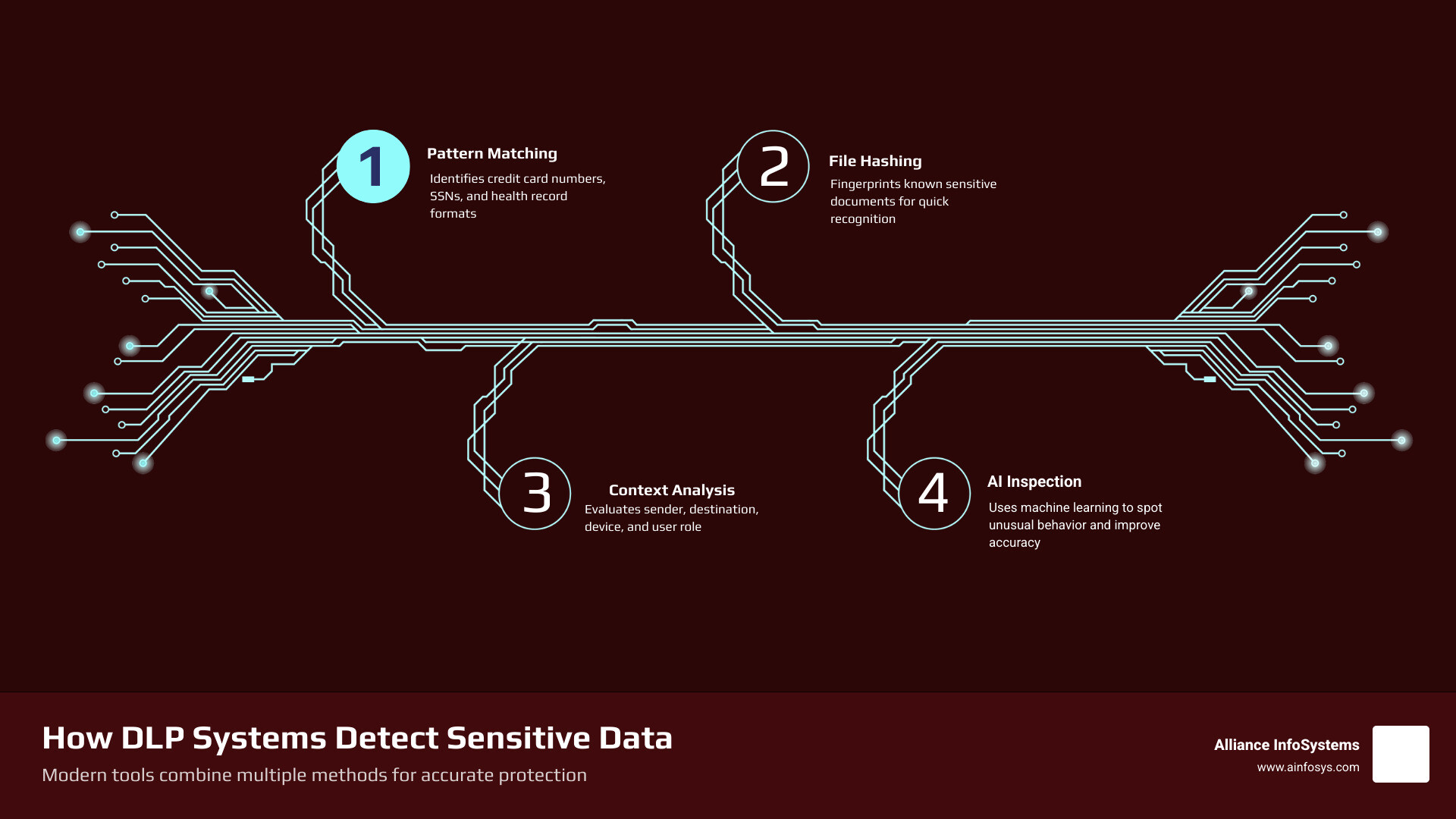
Common detection methods include pattern matching for credit card numbers, Social Security numbers, and health record formats, along with keyword and dictionary matching for legal, HR, or financial terms. More advanced systems may use file fingerprinting and hashing to identify known sensitive documents, context analysis to evaluate the sender, destination, device, app, or user role, and AI-enhanced inspection or machine learning to improve detection accuracy and spot unusual behavior.
In simple terms, the system is asking: “What is this data, where is it going, who is touching it, and should that be happening?”
That matters because context changes everything. Sending a spreadsheet with payroll data to finance may be normal. Sending the same file to a personal Gmail account at 11:48 p.m. is a different story.
Our post on better web data loss prevention explains how browser and web activity fit into that picture.
Primary Types of DLP Solutions: Network, Endpoint, and Cloud
Most organizations need more than one type of DLP. Sensitive data no longer lives in just one place, so protection cannot either.

The three primary categories are network DLP, endpoint DLP, and cloud DLP. Network DLP monitors and controls data moving across the network. Endpoint DLP protects data on laptops, desktops, and other user devices. Cloud DLP monitors data in SaaS apps, cloud storage, and cloud workloads.
Network and Endpoint Protection
Network DLP is strongest when you need visibility into outbound traffic. It can inspect email, uploads, file transfers, and traffic leaving the environment. It often works alongside firewalls, secure web gateways, and email security controls.
Endpoint DLP focuses on what users do on their devices. It can help control risky actions such as copying files to USB drives, printing sensitive documents, uploading files to unsanctioned websites, taking screenshots, or moving data between personal and business apps.
This is especially important for hybrid work. If the device is where work happens, the device must be part of the control plan.
Basic endpoint controls such as device restrictions, USB encryption, and least-privilege access remain very effective. Our Top 10 Cyber Security Practices covers several of these foundational safeguards.
Securing the Modern Cloud Ecosystem
Cloud DLP is built for today’s reality: Microsoft 365, Google Workspace, file sharing apps, collaboration tools, cloud databases, and AI-connected workflows.
This matters because many leaks now happen outside the traditional network perimeter. Employees may store files in personal cloud drives, paste confidential text into AI tools, or share sensitive links too broadly.
Cloud DLP can help by scanning SaaS apps for sensitive data exposure, monitoring file sharing permissions, detecting shadow IT and unsanctioned cloud usage, applying policies to browser uploads and prompts, and supporting remote users without requiring them to be in the office.
Research also suggests that by the end of 2026, fully remote and hybrid workers could represent 64% of all employees, up from 52% in 2021. That shift alone makes cloud-aware DLP a business necessity.
For practical steps to reduce exposure, see our guide on how to minimize data loss.
Why Organizations Need a Data Loss Prevention Strategy in 2026
A DLP tool without a strategy is like buying a smoke detector and then cooking directly under it every day. Technically, you have protection. Operationally, everybody is still unhappy.
Organizations need a DLP strategy because the risks are broader, more expensive, and more distributed than before.
DLP helps address accidental sharing by employees, malicious insider theft, phishing and compromised accounts, malware and ransomware, weak access controls, lost or stolen devices, misconfigured cloud storage, shadow IT, shadow data, and unsanctioned generative AI use.
The numbers are hard to ignore. The global average cost of a data breach is now USD 4.88 million. Nearly half of breaches involve customer PII, intellectual property appears in 43% of breaches, and malicious insider incidents have the highest average cost at USD 4.99 million. The risk also becomes harder to control when data is spread out: 40% of breaches occur in organizations storing data across multiple environments, 35% involve shadow data, and by 2027, 17% of cyberattacks or leaks are expected to involve generative AI.
The Role of Data Loss Prevention in Regulatory Compliance
DLP is also a compliance enabler.
While compliance is not the same thing as security, many regulations expect organizations to know where sensitive data is, restrict access, and prevent unauthorized disclosure. DLP supports those goals by providing visibility, policy enforcement, and audit trails.
DLP programs often support obligations tied to GDPR for personal data protection, HIPAA for protected health information, PCI DSS for payment card data, and other privacy and security requirements that affect U.S. organizations.
For Maryland businesses, state privacy obligations are part of the broader compliance picture as well. This overview of the Maryland Data Privacy Act helps explain the local landscape.
Key Benefits of a Data Loss Prevention Strategy
A mature DLP program helps organizations protect customer and employee data, reduce the risk of IP theft, improve visibility into data flows, block or encrypt risky transfers automatically, support investigations and reporting, strengthen user accountability, and reduce the cost and impact of incidents.
It also works best when paired with backup and recovery planning. DLP helps prevent exposure, while backup helps recover from deletion, corruption, ransomware, or human error. Our article on professional data backup solutions explains why both matter.
Overcoming Implementation Challenges and Best Practices
DLP is powerful, but it is not plug-and-play perfection. Organizations often struggle with false positives, privacy concerns, policy sprawl, and user frustration.
The most common challenges include too many alerts without enough context, poor data classification, limited visibility across hybrid environments, resistance from employees who feel watched, complex tuning for different departments and data types, and gaps between security policy and business workflows.
The best way forward is phased deployment. Start with discovery and monitoring, test policies with a pilot group, adjust based on real activity, and then enforce more aggressive controls. If something blocks half the accounting team on day one, that is not “strong security.” That is a help desk stress test.
Our Data Recovery 101 article pairs well with this planning mindset.
Data Classification and Policy Alignment
Strong DLP starts with knowing what you are protecting.
That means identifying sensitive information such as PII, financial records, intellectual property, contracts, HR and payroll files, customer communications, and regulated health or payment data.
This is harder than it sounds because a large share of enterprise data is unstructured. Files, emails, notes, screenshots, PDFs, and chat messages do not organize themselves out of politeness.
Best practices include creating a full data inventory across on-premises and cloud systems, classifying data by sensitivity and regulatory impact, building separate policies for different data types, using least-privilege access so users only see what they need, and assigning clear roles between policy creators, administrators, and responders.
For more real-world examples of how ordinary data handling goes wrong, see Big Picture: Everyday Examples of Data Loss.
Employee Education and Incident Response
Technology catches a lot, but people still decide whether to click, forward, upload, or overshare.
That is why employee education is part of every good DLP strategy. Users should understand what counts as sensitive data, which tools are approved for sharing, how phishing and social engineering work, why personal email and storage apps create risk, and what to do when they trigger a DLP warning.
Training should be ongoing, simple, and tied to actual job behavior. Combine awareness training with clear incident response steps so employees know who to notify and what happens next.
Helpful related resources include How to Stop Phishing Emails, 5 Simple Ways to Avoid Malicious Emails, and 7 Ways to Avoid Ransomware in Your Business.
Frequently Asked Questions about Data Loss Prevention
What is the difference between a data breach and a data leak?
A data breach usually means unauthorized access to information. A data leak often means accidental exposure, such as sending the wrong attachment or leaving a cloud folder open. A third term, data exfiltration, refers to deliberate theft or transfer of data out of the organization.
How does generative AI impact data loss prevention?
Generative AI creates new channels for data exposure. Employees may paste confidential content into AI prompts, upload documents for summaries, or use unapproved AI tools. DLP helps by monitoring uploads, browser activity, and content shared with AI-connected applications. This matters even more as AI-related leaks are expected to grow through 2027.
Why is a DLP policy essential for remote and hybrid workforces?
Because users, devices, and data are now everywhere. A DLP policy defines what data is sensitive, who can access it, where it can be sent, and what the system should do when a rule is broken. For remote and hybrid teams, that policy creates consistency across endpoints, cloud apps, home networks, and mobile work habits.
Conclusion
Data loss prevention is no longer optional for organizations that rely on digital operations, cloud platforms, and distributed teams. It is a practical way to reduce risk, protect sensitive information, support compliance, and give your team better visibility into how data moves.
At Alliance InfoSystems, we help Maryland organizations approach data protection as part of a broader IT and security strategy, not just a standalone tool purchase. That includes strategic planning, lifecycle management, and security decisions that align controls with business goals.
And because prevention should always be paired with recovery, we also recommend making backup and disaster recovery part of the conversation from day one. Learn more about our Professional Data Backup and Recovery Services.