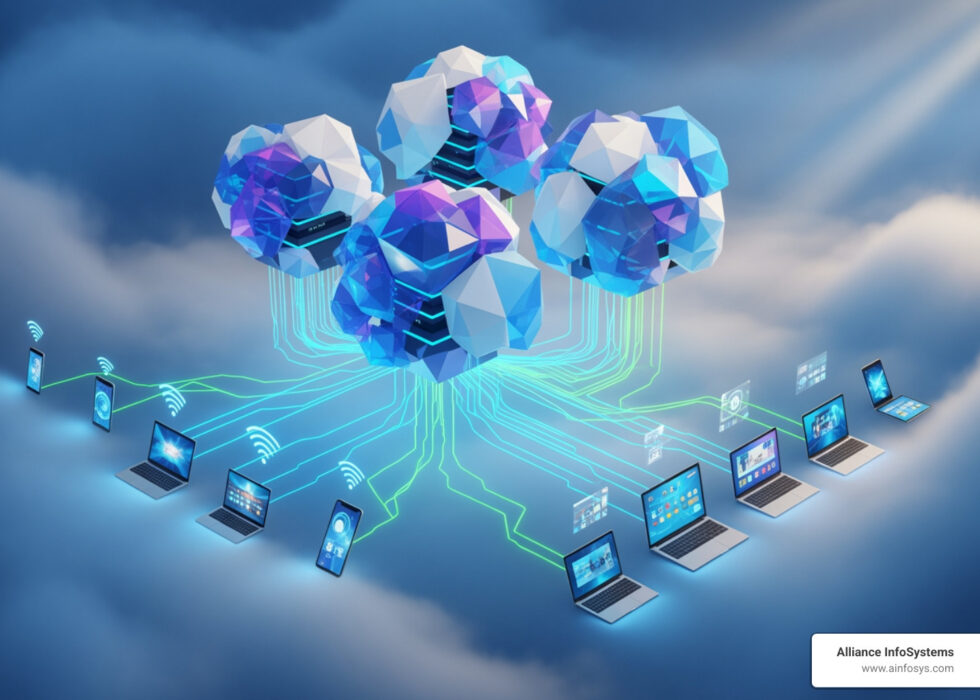
Why Choosing the Right Cloud Server for Your App Matters
Cloud server for apps are the backbone of modern application deployment, offering developers flexible, scalable infrastructure without managing physical hardware. Here’s what you need to know:
- What it is: A virtualized computing environment hosted by third-party providers, accessible remotely over the internet
- Main types: Public cloud (shared resources), Private cloud (dedicated resources), Hybrid cloud (combination of both)
- Core benefits: On-demand scalability, pay-as-you-go pricing, automatic updates, and enterprise-grade security
- Best for: Web applications, APIs, AI workloads, containerized services, and event-driven apps
- Popular platforms: Google Cloud (Cloud Run, Compute Engine), AWS, Render, Heroku, and Firebase App Hosting
The developer’s dilemma is real: with countless cloud products available, how do you choose the right one? Traditional servers mean fixed capacity, while cloud servers offer flexibility but introduce new questions about architecture and cost.
The challenge isn’t if you should use the cloud—it’s which cloud server matches your app’s needs. A monolithic app has different requirements than a microservice. A wrong choice leads to overpaying or performance bottlenecks.
This guide cuts through the complexity. We’ll explain IaaS, PaaS, and serverless options, cover key concepts like scale-to-zero, and help you match your app to the right hosting model. You’ll learn how to evaluate platforms, security, and compliance before committing.
As Sara Szot, President of Alliance Info Systems, I’ve helped countless businesses steer their cloud infrastructure decisions, specializing in matching the right Cloud server for apps to each organization’s unique technical and business requirements. My focus is on cutting through vendor marketing to deliver practical, cost-effective solutions.
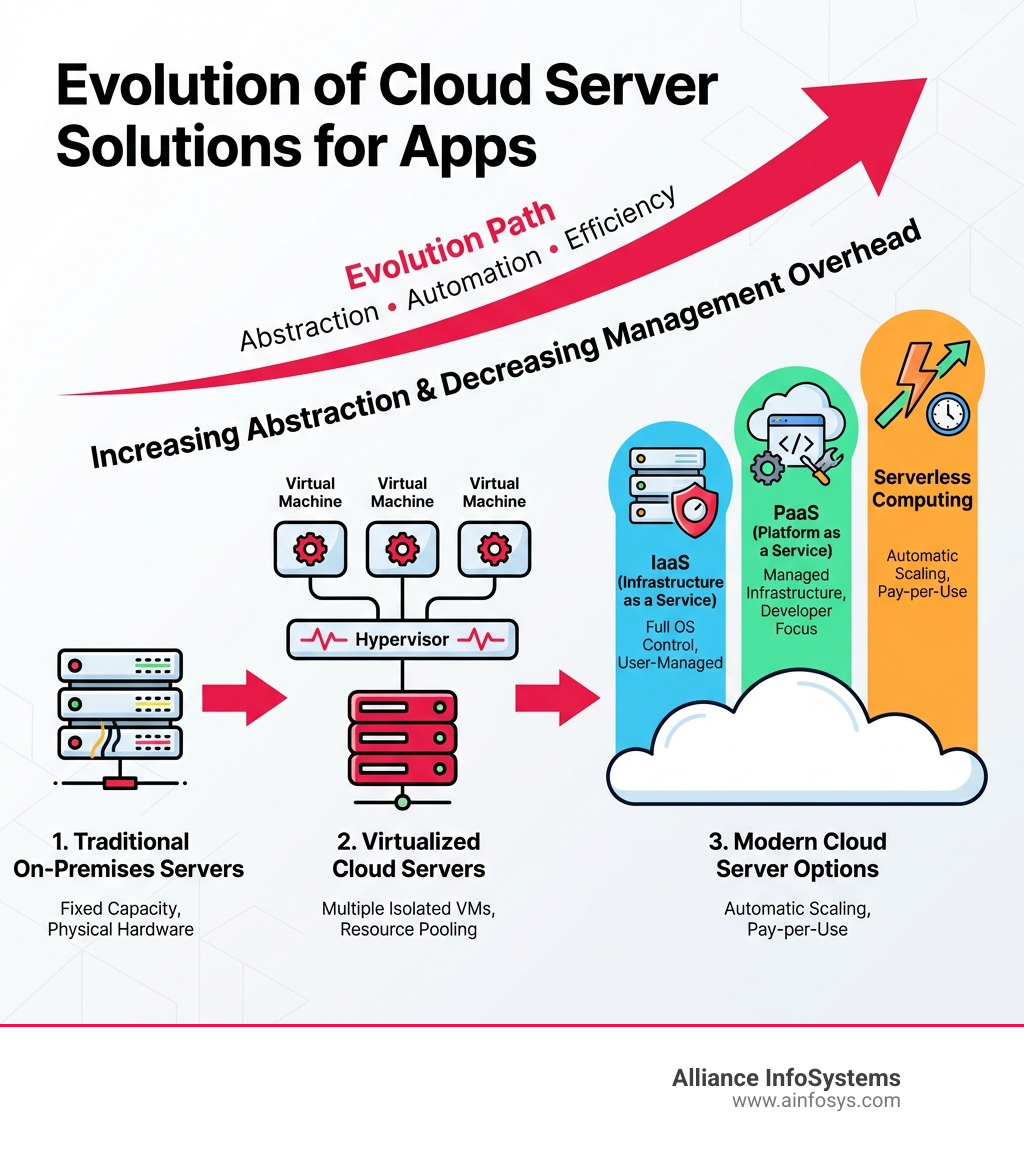
What is a Cloud Server? Explaining the Basics
At its core, a cloud server for apps is a virtual server running in a cloud computing environment. Unlike a physical server tied to one location, it’s hosted by a third-party provider and accessed remotely over the internet.
This flexibility comes from virtualization, a technology that uses a hypervisor to divide a physical server into multiple isolated virtual machines (VMs). The hypervisor allocates physical resources (CPU, memory, storage) to each VM, providing scalable computing power without on-site hardware. To learn more, check out our Cloud Virtualization Guide 2025.
A traditional server is a physical machine in your office, requiring upfront investment and maintenance. In contrast, a cloud server for apps is accessed remotely, offering greater flexibility and scalability. We explore this in our comparison of Cloud vs Local Server.
There are three main types of cloud servers, each with distinct characteristics:
- Public Cloud: These servers are owned and operated by a third-party cloud service provider (like Google Cloud). Resources are shared among multiple tenants over the internet. It’s highly scalable, cost-effective (pay-as-you-go), and requires minimal management from your side.
- Private Cloud: Dedicated to a single organization, a private cloud can be hosted on-site or by a third-party provider. It offers greater control, security, and customization, making it ideal for sensitive data or strict compliance requirements.
- Hybrid Cloud: This model combines elements of both public and private clouds, allowing data and applications to be shared between them. It offers the flexibility to use public cloud resources for non-sensitive workloads and private cloud for critical data, balancing cost-efficiency with control. Find more about the Benefits of Hybrid Cloud Server and why it might be the right fit for your applications.
Key Benefits of Using a Cloud Server for Apps
Cloud servers have revolutionized app development and management, offering flexibility, scalability, and cost-efficiency. Businesses in Maryland and beyond use them to shift IT from a capital to an operational expense, leading to faster innovation and improved resilience. For a deeper dive, explore our article on 5 Cloud server computing advantages you haven’t considered.
Best Scalability and Flexibility
Imagine a sudden traffic surge. With traditional servers, this could mean downtime or a sluggish user experience. A cloud server for apps, however, is designed to handle such fluctuations gracefully.
- On-demand Resources: Cloud servers provide immediate access to computing resources (CPU, RAM, storage) as your application needs them, eliminating waits for hardware procurement or manual setup.
- Vertical Scaling: If your application needs more power, you can “vertically scale” by increasing the resources (e.g., more CPU cores, more RAM) of your existing cloud server instance with a few clicks.
- Horizontal Scaling: For dynamic growth, “horizontal scaling” allows you to add more instances of your application across multiple cloud servers. This distributes the load and ensures your app remains responsive. Platforms like Render, for example, handle orchestration and scale services without requiring complex cluster management.
- Handling Traffic Spikes: This elasticity means your application can handle 100x burst traffic without manual tuning. When demand subsides, resources can be scaled back down, optimizing costs.
This flexibility allows developers to focus on building great features, knowing the underlying infrastructure can adapt.
Significant Cost-Efficiency
One of the most compelling arguments for adopting a cloud server for apps is the significant cost savings. It eliminates large upfront capital expenditures (CapEx) for hardware and data centers.
- Pay-as-You-Go Model: Cloud providers operate on a utility-based pricing model. You only pay for the computing resources you actually consume, meaning no wasted investment in idle hardware.
- Reduced CapEx: By shifting from purchasing physical assets to subscribing to cloud services, businesses can free up capital for core operations or innovation.
- Scale-to-Zero Concept: A game-changer for apps with intermittent traffic. “Scale-to-zero” means that during periods of no requests, your application can scale down to zero instances, so you aren’t billed for compute time when it’s not being used. This is a key differentiator for platforms like Google Cloud Run.
- Operational Efficiency: Cloud servers reduce the need for extensive in-house IT staff to manage physical infrastructure, further cutting operational costs.
For a balanced perspective, read our article on Going Cloud: Server Pros and Cons.
Robust Security and Compliance
Security is paramount, and cloud servers provide robust features to protect your data and infrastructure. While the cloud operates on a shared responsibility model (discussed later), providers invest heavily in enterprise-grade security.
- Managed Security: Cloud providers offer comprehensive security services, including firewalls, intrusion detection, and identity management. For instance, platforms like Firebase App Hosting integrate with Cloud Secret Manager for enterprise-grade security features like versioning and rotation.
- DDoS Protection: Many cloud server platforms offer built-in Distributed Denial of Service (DDoS) protection to automatically mitigate these threats. Render, for example, includes DDoS protection as a standard feature.
- Data Encryption: Data at rest (stored) and in transit (moving across networks) is typically encrypted, ensuring confidentiality. Render boasts minimum AES-128 encryption for databases, backups, and secrets.
- Compliance Standards: For businesses in regulated industries, cloud providers often adhere to stringent compliance standards such as SOC 2 Type II, HIPAA, ISO 27001, and GDPR, helping organizations meet their regulatory obligations.
Leveraging specialized services like Managed Security can further improve your application’s defense posture, ensuring your cloud server for apps remains secure.
Choosing the Right Architecture: A Guide to Cloud Service Models
Choosing a cloud server for apps isn’t a one-size-fits-all decision. The optimal choice often depends on the level of control you need, the complexity of your application, and your team’s expertise. Cloud computing offers various service models, each abstracting away different layers of infrastructure management. Understanding these models—Infrastructure as a Service (IaaS), Platform as a Service (PaaS), and Serverless (Function as a Service)—is crucial for making an informed decision.

Infrastructure as a Service (IaaS): Maximum Control
IaaS provides the most fundamental building blocks of cloud computing. With IaaS, you rent virtualized computing resources—like virtual machines (VMs), storage, and networking—over the internet. You manage the operating system, applications, and middleware, while the cloud provider manages the underlying physical infrastructure.
- Monolithic Workloads & Legacy Apps: IaaS is often the go-to for traditional, monolithic applications or legacy systems that require specific operating system configurations or deep control over the environment. Think relational databases, SAP HANA, CRM systems, or legacy ERP systems that can be lifted and shifted to the cloud.
- Full OS Access: You get full root access to your virtual servers, allowing you to install any software, configure settings, and manage the operating system as if it were a physical machine.
- VM Images: Applications are deployed as VM images, which are snapshots of an entire filesystem, including the underlying OS. Google Cloud’s Compute Engine is a prime example of an IaaS offering, providing virtual machines for workloads requiring OS-level control and compatibility with existing infrastructure.
- When to Choose IaaS: Choose IaaS when you need maximum control over your infrastructure, have existing applications that are difficult to refactor for PaaS or serverless, or when your team has the expertise to manage operating systems and middleware.
Platform as a Service (PaaS): Accelerating Development
PaaS provides a complete development and deployment environment in the cloud. It abstracts away the underlying infrastructure, allowing developers to focus solely on writing code without worrying about operating systems, servers, or networking.
- Web Services & APIs: PaaS is ideal for deploying web applications, APIs, and microservices. Platforms like Heroku, Render, and Firebase App Hosting are excellent examples of PaaS, simplifying the deployment of web frameworks like Flask, Django, Express.js, Symfony, and Spring Boot. Render positions itself as a managed PaaS offering that helps developers build, deploy, and scale web applications, APIs, and static sites.
- Managed Infrastructure: The provider manages the operating systems, runtime environments, databases, and web servers. This significantly reduces operational overhead.
- CI/CD Integration: Many PaaS platforms offer built-in or easy integration with Continuous Integration/Continuous Deployment (CI/CD) pipelines, enabling automated deployments directly from your code repository. For instance, Firebase App Hosting allows you to connect your GitHub repository and roll out to production with a simple ‘git push’.
- When to Choose PaaS: Opt for PaaS to accelerate development, reduce infrastructure management, and when your application fits well within the platform’s supported languages and frameworks.
Serverless & Containers: The Future of the Cloud server for apps
Serverless computing, often called Functions as a Service (FaaS), takes abstraction a step further, allowing you to run code without provisioning or managing any servers at all. Containers, while not exclusively serverless, are a key enabler for modern, scalable application architectures.
- Event-Driven Apps: Serverless is perfect for event-driven workloads, where code executes in response to specific triggers (e.g., an HTTP request, a database change, a file upload). Examples include processing user-generated data, sending notifications, or generating image thumbnails. Google Cloud Run is an excellent choice for HTTP services, backend apps, and event-driven workloads, offering automatic scaling and pay-per-use billing.
- Microservices: Both serverless functions and containerized applications are well-suited for building microservices architectures, breaking down large applications into smaller, independent, and easily manageable components.
- Containerized Apps: Containers, like Docker, package an application and all its dependencies into a single, portable unit. This ensures consistency across different environments. Cloud platforms can deploy these portable, isolated filesystems. Containers are portable cross-platform filesystems isolated from the underlying OS.
- Functions as a Service (FaaS): Functions are individual code snippets, each corresponding to a single use case. They are invoked only when needed and scale automatically up or down (even to zero) based on demand.
- When to Choose Serverless/Containers: Choose serverless for highly scalable, cost-effective, event-driven applications with unpredictable traffic. Use containers for consistent environments, complex applications broken into microservices, or when you need more control than FaaS but less than IaaS.
Here’s a quick comparison of the service models:
| Feature | IaaS | PaaS | Serverless (FaaS) |
|---|---|---|---|
| Control | High (OS, middleware, apps) | Medium (apps, data) | Low (code) |
| Management | You manage OS, runtime, applications | Provider manages OS, runtime, databases | Provider manages everything |
| Scalability | Manual or auto-scaling of VMs | Automatic scaling of application instances | Automatic, event-driven scaling to zero |
| Use Cases | Legacy apps, custom OS, monolithic workloads | Web apps, APIs, microservices, rapid development | Event-driven functions, real-time processing |
Key Considerations When Choosing a Cloud Server for Apps
Selecting the right cloud server for apps is a strategic decision that impacts performance, cost, security, and developer productivity. It’s like choosing the perfect vehicle for a journey – you wouldn’t use a bicycle for a cross-country move, nor a semi-truck for a quick trip to the store.

When making your choice, we recommend evaluating your needs based on budget, technology requirements, and provider capabilities. Consider workload variability, data sensitivity, and whether a public, private, or hybrid setup is best. Assess security and compliance needs, and potential growth.
Matching the App Type to the Hosting Model
The first step is to clearly define your application’s characteristics and requirements.
- Web Services & APIs: For standard HTTP services, RESTful APIs, or backend applications, PaaS solutions like Render or Google Cloud App Engine offer managed environments that simplify deployment and scaling. Cloud Run is particularly strong for these, supporting various web frameworks and microservices.
- Event-Driven Apps: Applications that respond to events (e.g., user actions, data changes, messages) are ideal for serverless functions or platforms like Cloud Run. These scale efficiently and cost-effectively, processing events as they occur.
- Containerized Apps: If your application is packaged in containers (like Docker), platforms supporting container orchestration (such as Google Kubernetes Engine for complex needs) or simplified container deployment (like Cloud Run or Render) are excellent choices. They ensure consistency and portability.
- Monolithic Workloads: Larger, traditional applications that require a specific operating system or have complex dependencies often benefit from IaaS solutions like Google Cloud Compute Engine, where you have full control over the virtual server environment.
- AI Workloads: Cloud servers are increasingly powering big data analytics and AI workloads. Platforms like Heroku are expanding their AI PaaS framework with managed inference and agents, providing access to leading proprietary AI models such as Claude Opus 4.5, Nova 2, and open-weight models like Kimi K2 thinking. Firebase App Hosting even helps you ship performant AI-powered features using ready-to-deploy Gemini sample apps. For GPU-optimized workloads, hardware acceleration support is a key consideration.
Understanding Core Technical Concepts for your cloud server for apps
Beyond the service model, several technical concepts will influence your choice and how you interact with your chosen cloud server.
- Deployment Formats: How do you get your code onto the cloud server? Options include:
- VM images: Snapshots of an entire operating system and application stack, typically for IaaS.
- Containers: Portable, isolated filesystems that package your app and its dependencies, used across PaaS and serverless.
- Sources: Deploying directly from your source code repository, where the platform builds the container or runtime environment for you (e.g., Firebase App Hosting, Render).
- Functions: Individual code snippets for single use cases, characteristic of serverless FaaS.
- Custom domain names: Most cloud server platforms allow you to connect your own custom domain (e.g., www.your-app.com) to your deployed application, often with automatic SSL/TLS certificate management.
- Persistent Disks: If your application needs to store data that persists even if the server instance is restarted or replaced, you’ll need persistent disks. These are network-attached storage volumes that can be mounted to your cloud server instances.
- WebSockets: For real-time applications requiring persistent, bidirectional communication (e.g., chat apps, live dashboards), ensure your chosen platform fully supports the WebSocket protocol.
- Background Processes: Does your application need to run tasks in the background, like cron jobs, queue workers, or data processing? Some serverless platforms might have limitations on long-running background processes, while PaaS and IaaS generally offer more flexibility.
- Hardware acceleration: For compute-intensive tasks, especially in AI/ML, the ability to leverage GPUs or other specialized hardware accelerators can be critical.
Planning for Growth and Modern Practices
Your choice of cloud server for apps should also align with modern development methodologies and future growth.
- CI/CD Integration: Seamless integration with Continuous Integration/Continuous Deployment pipelines is crucial for rapid iteration and reliable deployments. Platforms like Render and Firebase App Hosting emphasize automated deployments directly from your code repository.
- Infrastructure as Code (IaC): Tools like Render Blueprints or Terraform allow you to define and manage your infrastructure using code, making environments reproducible, versionable, and easier to scale. This is a best practice for managing complex cloud environments.
- Future Scalability Needs: Always consider your application’s potential growth. Will the chosen platform easily accommodate increased traffic, new features, or a larger user base without requiring a complete re-architecture? The ability to scale both horizontally and vertically is key.
- Migration Strategy: If you’re moving an existing application, consider the ease of migration. For guidance on moving to the cloud, consult our Cloud migration guide.
Frequently Asked Questions
When exploring cloud server for apps, a few common questions often arise. Let’s tackle some of these to clarify key concepts.
How do cloud servers differ from virtualization?
This is a great question, as the two terms are closely related but not interchangeable.
- Virtualization is the technology that enables cloud servers. It’s the process of creating a virtual version of something, whether it’s a server, storage device, network resource, or operating system. As we mentioned, virtualization uses a hypervisor to divide a single physical server into multiple virtual machines. It’s the underlying engine. For a deeper understanding, explore our Cloud Virtualization Services.
- A cloud server for apps is a service built upon virtualization technology. It’s a virtual server that is provided as part of a larger cloud computing infrastructure. While all cloud servers use virtualization, not all virtualized environments are necessarily “cloud servers” in the broader sense of being part of a scalable, on-demand, remotely accessible cloud platform.
Virtualization is how cloud servers are made possible, and a cloud server is a product or service that leverages virtualization to deliver computing resources.
What is ‘scale-to-zero’ and why is it important for apps?
“Scale-to-zero” is a powerful feature offered by some cloud server platforms, particularly in serverless and container-based environments like Google Cloud Run.
- Definition: It means that when your application or service receives no traffic or requests, the cloud platform can automatically scale down the number of active instances to zero. When a new request comes in, the platform quickly “spins up” an instance to handle it.
- Cost Savings: This is incredibly important for cost-efficiency. With traditional servers or even always-on cloud VMs, you pay for resources whether they are being used or not. Scale-to-zero ensures you only pay for compute time when your application is actively processing requests, leading to significant savings during idle periods.
- Ideal for Event-Driven or Low-Traffic Apps: This feature is especially beneficial for applications with unpredictable or infrequent usage patterns, such as:
- Internal tools used only during business hours.
- Event processors that run only when triggered.
- New applications with low initial user traffic.
- Chatbots or APIs that receive requests intermittently.
It’s a prime example of the pay-as-you-go model maximizing cost-effectiveness for a cloud server for apps.
What security responsibilities do I have on a cloud server?
When using a cloud server for apps, security operates under a “shared responsibility model.” This means both you and the cloud provider have roles in ensuring your application and data are secure.
- Cloud Provider’s Responsibility (“Security of the Cloud”): The provider is responsible for the security of the underlying infrastructure. This includes:
- Physical security of data centers.
- Network infrastructure (firewalls, routing).
- Hardware and virtualization software.
- Global infrastructure resilience and redundancy.
- Compliance certifications (e.g., SOC 2, HIPAA, ISO 27001).
- User’s Responsibility (“Security in the Cloud”): You, as the user, are responsible for securing everything you put into or configure within the cloud. This includes:
- Data Security: Protecting your data through encryption at rest and in transit, access controls, and data backup/recovery strategies.
- Application Security: Securing your application code, dependencies, and configurations.
- Operating System & Middleware: If using IaaS, patching and configuring the OS, runtime environments, and middleware.
- Network Configuration: Setting up virtual private clouds (VPCs), network access control lists (ACLs), and security groups.
- Identity and Access Management (IAM): Managing user accounts, roles, and permissions to ensure only authorized individuals and services can access your resources. Platforms like Render offer unique user identification and role-based access control out of the box.
- Monitoring & Logging: Implementing monitoring and logging to detect and respond to security incidents.
The cloud provider secures the cloud, and you secure your assets and configurations within the cloud. Neglecting your responsibilities can expose your applications to significant risks. For businesses in Maryland, robust security practices are not just good practice, they are often a regulatory necessity.
Conclusion: Making the Right Choice for Your Application
Choosing a cloud server for apps is a strategic advantage. The right solution depends entirely on your application’s specific needs.
- IaaS (like Google Cloud Compute Engine) is best for maximum control and legacy applications.
- PaaS (like Render, Heroku, or Firebase App Hosting) is ideal for modern web services and APIs, accelerating development.
- Serverless (like Google Cloud Run) is powerful and cost-effective for dynamic, event-driven apps that can scale to zero.
Consider your app’s architecture, traffic patterns, team expertise, and compliance needs. Think about deployment formats, storage, and modern practices like CI/CD and Infrastructure as Code for future growth.
At Alliance InfoSystems, we understand these nuances. With over 20 years of experience helping Maryland businesses manage their IT, we cut through the complexity to find the most flexible, customized, and cost-efficient cloud solutions for your applications.
Don’t let the developer’s dilemma slow you down. If you need custom advice for your cloud server for apps, reach out to us. We’re here to help you make the right choice and ensure your applications thrive in the cloud.