Why Managed IT Support is More Critical Than Ever
Managed IT support is a service where a third-party provider, or Managed Service Provider (MSP), proactively monitors and manages your business’s IT infrastructure for a predictable monthly fee. Instead of reacting to problems, an MSP works to prevent issues, improve security, and align technology with your business goals. This approach frees you to concentrate on growth, not technology headaches.
Technology should make your business more efficient, but many owners spend too much time on IT issues. The reality is stark: businesses using managed IT services report an average 20-30% reduction in operational costs and a 50% reduction in downtime. They gain peace of mind and the freedom to focus on what they do best.
The managed IT services market is projected to grow to $557.92 billion by 2030. Businesses of all sizes realize that managing complex IT, defending against cyber threats, and staying current with technology requires specialized expertise that is difficult and expensive to build in-house.
This guide will help you understand what managed IT support is, how it differs from traditional models, what services are available, and how to choose the right provider for your business.
What is Managed IT Support and Why is it Essential?
Managed IT support means having an entire IT department working behind the scenes to keep your technology running smoothly, without the overhead of an in-house team. A Managed Service Provider (MSP) takes full responsibility for monitoring, maintaining, and managing your IT infrastructure through a service level agreement.
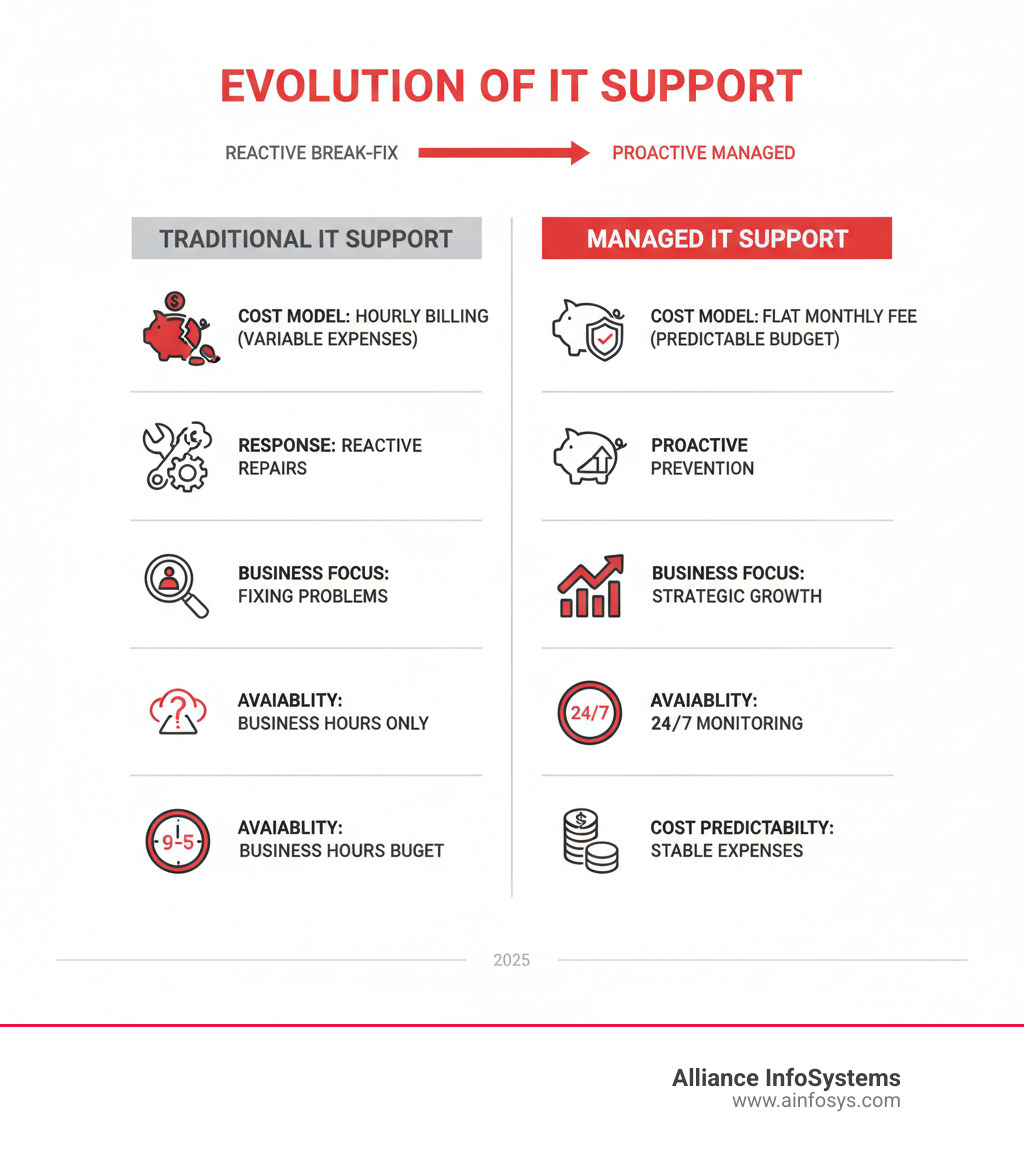
The model is proactive, not reactive. Instead of waiting for a server to crash or a network to get infected, an MSP watches your systems 24/7 to catch potential problems before they disrupt your business. This approach evolved from early remote management services in the 1990s into the comprehensive, subscription-based IT management that businesses in Maryland and across the country rely on today.
Curious if this model makes sense for your business? Check out Can Managed Services Benefit Your Business? for a deeper dive.
The Core Benefits for Your Business
Partnering with a managed IT provider delivers measurable advantages that impact your bottom line:
- Predictable IT Spending: A flat monthly fee transforms IT from an unpredictable variable into a stable operational cost, making budgeting simple.
- Effortless Scalability: Your MSP can scale services up or down as your business grows or changes, without the need to hire staff or purchase new equipment.
- Improved Security: With dedicated teams monitoring for threats and applying updates, businesses report a 90% improvement in their cybersecurity posture.
- Reduced Operational Costs: Companies typically see IT costs drop by 20-30% by eliminating salaries, training, and other expenses associated with an in-house team.
- Minimized Downtime: Proactive monitoring leads to about 50% less downtime, keeping your team productive and customers happy.
- Access to Specialized Expertise: Gain access to a full team of certified professionals in cybersecurity, cloud architecture, and more, for a fraction of the cost of hiring them directly.
- Focus on Core Business: Over 70% of businesses report that managed IT frees up internal staff to work on strategic initiatives instead of fighting fires.
Want to learn more? Download The Beginner’s Guide to Managed IT Services for practical insights.
How Proactive Support Prevents Problems
The philosophy of managed IT support revolves around prevention. Here’s how it works:
- 24/7 Remote Monitoring: Systems watch over your entire IT environment around the clock, detecting anomalies and potential failures in real-time.
- Patch Management: All operating systems and applications are automatically updated with the latest security patches, closing vulnerabilities before they can be exploited.
- System Health Checks: Regular diagnostic checks maintain optimal system health, addressing issues like low disk space or unusual network activity before they cause a crisis.
- Automated Alerts: Monitoring tools immediately notify technicians of any concerns, allowing for rapid investigation and resolution, often before you notice a problem.
The goal is to prevent issues from disrupting your business, ensuring your technology is an asset that drives you forward. In today’s threat landscape, this vigilance is essential. Learn more in our article on Recent Malware & Virus Threats Require Managed Services.
A Spectrum of Solutions: Types of Managed IT Services
Effective managed IT support isn’t a one-size-fits-all solution. A capable MSP offers a spectrum of services that can be custom to your specific business challenges and goals. This flexibility ensures you get comprehensive coverage where you need it most, without paying for services you don’t use.

Here are the key categories of services that form the foundation of modern managed IT support.
Core Infrastructure and Help Desk Support
This covers the day-to-day IT operations that keep your business running smoothly.
- Remote Monitoring and Management (RMM): Tools that provide 24/7 oversight of your networks, servers, and endpoints to identify issues proactively and automate maintenance.
- 24/7 Help Desk: Around-the-clock access to IT advisors for responsive support with password resets, software glitches, and other user issues.
- On-Site Support: Hands-on technical assistance at your Maryland location for hardware installations or complex network problems.
- IT Asset Management: Tracking of all hardware and software to simplify lifecycle management, financial reporting, and security.
- Network Administration: Ongoing management to ensure your network infrastructure remains secure, fast, and reliable.
For quick solutions to everyday problems, check out 4 Common PC Issues and How to Fix Them.
Managed Cybersecurity Services
Robust cybersecurity is essential for survival in today’s threat landscape.
- Managed Security Operations Center (SOC): A dedicated team of security experts monitoring your network 24/7 to detect and neutralize threats as they appear.
- Threat Detection and Response: Advanced tools and strategies for proactive threat hunting and rapid incident response to protect against phishing, malware, and ransomware.
- Vulnerability Management: Regular assessments to identify and fix security weaknesses in your systems before they can be exploited.
- Compliance Support: Expert guidance and built-in controls to meet industry regulations like HIPAA, CMMC, FINRA, and SOC 2. Companies using managed IT are 60% more likely to meet compliance requirements.
- Security Awareness Training: Educating your employees on cybersecurity best practices to turn them into your first line of defense.
Explore Find Best IT Security Service Providers for insights on building better protection.
Cloud Management and Migration
With most IT spending shifting to the cloud, getting your cloud strategy right is critical.
- Cloud Strategy and Migration: Developing a clear roadmap for your cloud journey and executing a seamless migration to the cloud with minimal disruption.
- Public, Private, and Hybrid Cloud Management: Expert management of your infrastructure on platforms like AWS, Azure, and GCP to ensure security, performance, and cost-optimization.
- Microsoft 365 and Azure Management: Specialized support for managing and securing these essential business platforms.
- Server Virtualization: Leveraging virtualization to improve resource utilization, lower hardware costs, and improve disaster recovery capabilities.
Our Cloud Migration Experts for a Seamless Transition can guide you through every step.
Business Continuity and Disaster Recovery
Comprehensive planning ensures your business can survive unexpected disruptions.
- Data Backup Solutions: Implementing consistent, automated backups of your critical data to secure, off-site locations.
- Disaster Recovery Planning: Developing a clear, actionable plan to restore your systems and data quickly after a major incident.
- Data Loss Prevention (DLP): Strategies like encryption and access controls to prevent data loss from happening in the first place.
Protect your data with our Data Backup & Recovery services.
Fully Managed vs. Co-Managed IT
Choosing the right model depends on your existing IT capabilities.
- Fully Managed IT: The MSP acts as your complete, outsourced IT department. This is ideal for businesses without an in-house IT team who want to offload all IT management.
- Co-Managed IT: The MSP partners with your existing IT staff, augmenting their skills and handling specific tasks like 24/7 monitoring or cybersecurity. This frees your team to focus on strategic projects.
Both models offer significant advantages. Find out how to scale your IT effectively with IT Staff Augmentation: The Smartest Way to Scale.
Managed IT Support vs. Traditional Models
Understanding managed IT support is clearer when compared to traditional IT models. The shift from reacting to problems to actively preventing them represents a fundamental change in IT strategy, evolving from early remote services in the 1990s to the proactive model used today. For context, the history of outsourcing shows how service delivery has evolved.

The Break-Fix Model: A Reactive Approach
Before managed services, most businesses used the break-fix model: when something breaks, you call a technician and pay an hourly rate for the repair. This approach leads to unpredictable costs, making budgeting a nightmare. A deeper issue is the misaligned incentive: the provider profits from your downtime, not from keeping your systems running smoothly. This model focuses entirely on repair rather than prevention, leaving your business vulnerable to unexpected failures and costly interruptions.
The In-House IT Team: Pros and Cons
Building an internal IT department offers full control and deep company knowledge. However, this approach comes with significant drawbacks. The high overhead costs of salaries, benefits, and training for even one IT professional in Maryland can exceed $120,000 annually. A small team will inevitably have talent gaps, as no single person can be an expert in cybersecurity, cloud, and networking. This often leads to limited availability outside of business hours and a high burnout risk, as the team gets bogged down in daily tasks instead of focusing on strategic projects. This is why over 70% of businesses report that managed IT services allow their internal IT staff to focus on more strategic initiatives.
The Financials: Pricing Models and Calculating ROI
Investing in managed IT support is a strategic financial move that brings predictability to your technology expenses and delivers a return far beyond simple cost savings.

How are managed IT services priced?
Unlike the unpredictable hourly rates of break-fix, managed IT services use structured pricing for budget predictability. Common models include:
- Per-User Model: A fixed monthly fee for each employee, which scales easily as your team grows.
- Per-Device Model: A fee for each managed desktop, server, or network device.
- Tiered Pricing: Packages (e.g., basic, premium) that bundle different levels of service, allowing you to choose what fits your needs and budget.
- A La Carte Services: Specific services selected individually, useful for augmenting an in-house team.
Costs are influenced by your organization’s size, the complexity of your IT environment, and the breadth of services required, including any specialized compliance support. For more on this, see our guide on Affordable Managed IT Services for Small Businesses.
How to Evaluate the ROI of Managed IT Support
The true value of managed IT support appears in multiple areas of your business. Consider these key factors when calculating your ROI:
- Reduced Downtime Cost: Managed services reduce downtime by an average of 50%. Calculate your hourly revenue loss from an outage to see the direct savings.
- Productivity Gains: With fewer IT issues and faster support, your employees can accomplish more, improving morale and work quality.
- Lower Capital Expenditure: Convert large, unpredictable hardware and software purchases into a predictable monthly operational expense, freeing up capital for growth.
- Avoided Hiring Costs: Access a full team of certified experts for less than the cost of hiring one or two full-time IT employees, saving an average of 25% on talent acquisition.
- Improved Cybersecurity: Avoid the catastrophic costs of a data breach. Managed services improve security posture by 90% and make you 60% more likely to meet compliance.
- Strategic Value: A good MSP acts as a strategic partner, helping you leverage technology for a competitive advantage that drives innovation and growth.
For a deeper dive into smart technology investments, explore our guide on Top IT Investments 2025 Budget.
Choosing Your Partner: A Step-by-Step Guide
Selecting a managed IT support provider is like choosing a business partner. This relationship will touch every part of your operations, so due diligence is essential. After more than 20 years serving businesses in Maryland, we know the best partnerships are built on trust, transparency, and a true understanding of your business.

Key Considerations When Selecting a Provider
Look beyond the sales pitch to find a provider that is the right fit. Key factors to evaluate include:
- Technical Expertise and Certifications: Ensure they have certified professionals who stay current with emerging technologies and threats.
- Relevant Industry Experience: A provider familiar with your industry (e.g., healthcare with HIPAA) will understand your unique challenges.
- Response Times and Scalability: Confirm their guaranteed response times and their ability to grow with your business.
- Client Testimonials and References: Speak with current clients to get honest feedback on their performance and reliability.
- Proactive Approach: Verify they offer true 24/7 monitoring and preventative maintenance, not just a reactive service with a retainer.
- Strategic Guidance: The best MSPs act as advisors, helping you align technology with your business goals. Learn more about what to expect in What you should be getting when you hire a professional service provider.
Understanding the Service Level Agreement (SLA)
The Service Level Agreement (SLA) is your contract, defining the provider’s commitments. As TechTarget’s definition notes, an MSP’s service is defined by its SLA. Scrutinize key components like uptime guarantees, response and resolution times for different issue severities, reporting metrics for transparency, and clear escalation procedures. Ensure the scope of services is clearly defined to avoid future misunderstandings.
Best Practices for a Successful Partnership
A successful partnership begins with a structured onboarding process where the provider learns your systems and creates a roadmap for improvement. The foundation for long-term success includes clear communication through regular check-ins, annual strategic planning sessions to align technology with business goals, and clearly defined roles and responsibilities, especially in a co-managed environment. This transforms the relationship from a simple service to true IT Consulting Services, helping you gain a competitive advantage.
Frequently Asked Questions about Managed IT Support
Here are answers to the most common questions we hear from businesses considering managed IT support.
What’s the difference between managed and co-managed IT?
Fully managed IT is a complete outsourcing of your IT department to an MSP. We handle everything. Co-managed IT is a partnership where we augment your existing in-house IT team, filling skill gaps, providing 24/7 monitoring, or handling specialized projects. This allows your team to focus on strategic initiatives. Learn more in our guide on IT Staff Augmentation: The Smartest Way to Scale.
Can managed IT services help with industry compliance?
Yes. An experienced MSP is critical for navigating complex regulations like HIPAA, CMMC, FINRA, and SOC 2. We implement the required technical controls, provide continuous monitoring, and generate the detailed documentation needed to pass audits. With over 20 years of experience, Alliance InfoSystems helps businesses across various industries meet their compliance obligations.
How long does it take to onboard with a managed IT provider?
Onboarding time varies from a few weeks for a small business to a couple of months for a larger, more complex organization. A reputable provider uses a structured process that includes a thorough assessment, detailed planning, and a phased implementation. This methodical approach ensures a smooth transition with minimal disruption to your daily operations while setting the foundation for a successful long-term partnership.
Conclusion
Technology should be a competitive advantage, not a source of stress. That is the core principle behind managed IT support. By partnering with an MSP, you can achieve a 20-30% reduction in operational costs, 50% less downtime, and a 90% better security posture. More importantly, you gain the freedom to focus on what you do best: growing your business.
Managed IT support is not about handing over control; it’s about gaining a strategic partner. Whether you need to completely outsource your IT or augment your existing team, the right MSP becomes an extension of your business.
At Alliance InfoSystems, we have spent over 20 years helping Maryland businesses turn technology into a powerful asset. Our flexible, customized approach ensures you get the exact support you need to stay ahead of evolving challenges and achieve your goals.
Ready to make your technology work for you? Explore how our Managed IT Services can transform your business and find your competitive edge.