
Why SQL Server Disaster Recovery Matters
When disaster strikes, a business’s ability to recover hinges on robust sql disaster recovery best practices. To ensure business continuity and minimize data loss, follow these core principles:
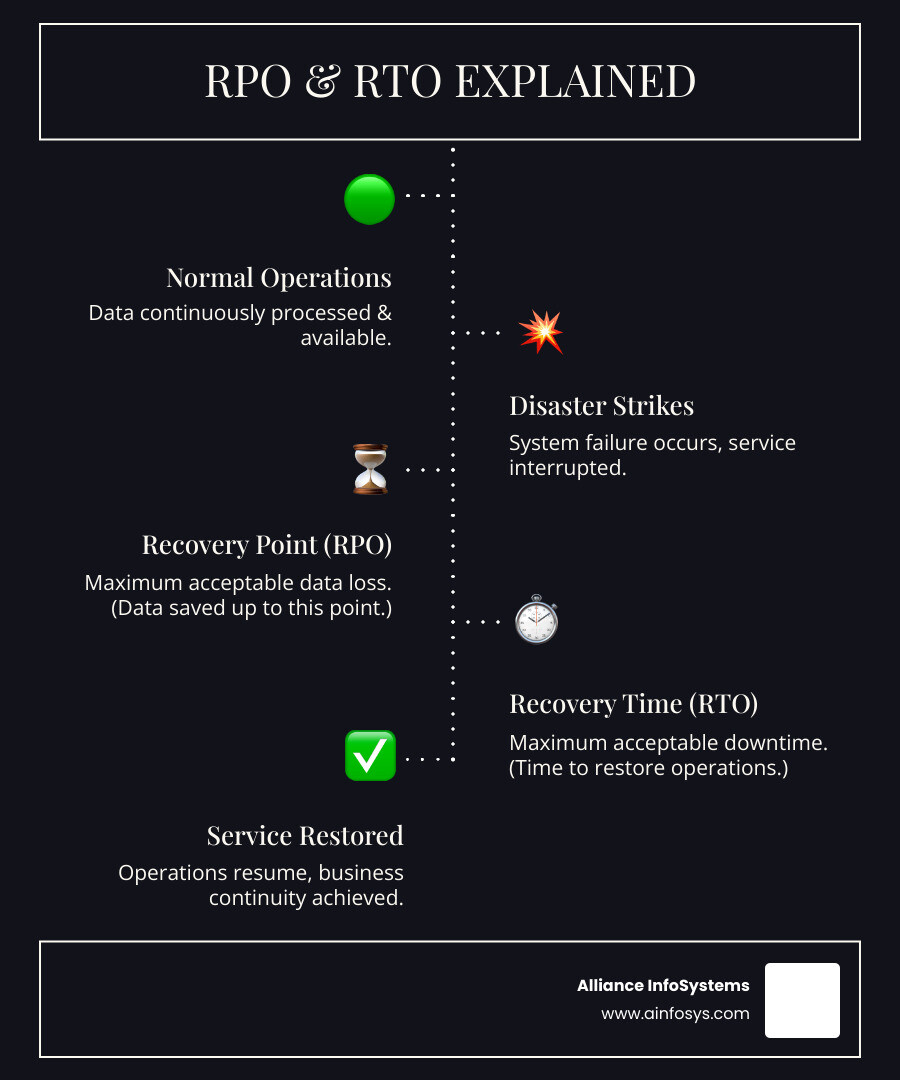
- Define RPO and RTO: Establish your Recovery Point Objective (how much data you can lose) and Recovery Time Objective (how long you can be down).
- Test Backups: A backup is useless until it’s successfully restored. Regular testing is non-negotiable.
- Document Everything: Create a clear, step-by-step plan for every recovery scenario.
- Combine HA/DR Solutions: Use a mix of technologies like Always On Availability Groups, Log Shipping, and backups for comprehensive protection.
- Practice Drills: Regularly simulate disasters to validate your plan and prepare your team.
Businesses run on data. If your SQL Server database goes down, operations can grind to a halt. Unplanned outages, from hardware failures to cyberattacks, can cause significant Data Loss. Without a solid recovery plan, the consequences can be devastating.
A comprehensive SQL Server disaster recovery strategy is a necessity. It protects your critical information and ensures your business can quickly recover, no matter what happens. This guide will walk you through the essential steps to build a resilient SQL Server environment and ensure Business Continuity.
Laying the Foundation: Key Metrics and Concepts
Before diving into specific techniques, understand the foundational concepts of SQL Server disaster recovery. These key metrics guide the creation of a recovery plan that fits your business needs, defining how much downtime and data loss is acceptable. Understanding these concepts is the first step toward building a resilient strategy for planned maintenance, unexpected outages, or major emergencies.
Understanding RPO, RTO, and SLA
Three critical metrics form the basis of any DR plan: RPO, RTO, and SLA. They determine how much data you can afford to lose and how long your systems can be down.
-
Recovery Point Objective (RPO): This is your data loss tolerance. An RPO of 15 minutes means you can accept losing up to 15 minutes of data. A lower RPO requires more frequent and faster backup or replication strategies. The RPO for a critical database might be minutes, while a test environment could have an RPO of hours.
-
Recovery Time Objective (RTO): This is your downtime tolerance. An RTO of 4 hours means you have a maximum of four hours to get systems running again after a disaster. A tight RTO requires fast, often automated, recovery processes.
-
Service Level Agreement (SLA): This is your formal promise to customers and internal stakeholders regarding service availability. In DR, your SLA is built from your RPO and RTO goals, translating business needs into measurable technical commitments.
These three metrics are the bedrock of sql disaster recovery best practices. Stricter RPO and RTO goals lead to more complex and expensive solutions. The key is to balance business needs with practical, affordable technology.
High Availability vs. Disaster Recovery: What’s the Difference?
A common point of confusion is the distinction between High Availability (HA) and Disaster Recovery (DR). They are two different but complementary strategies.
High Availability (HA) focuses on preventing downtime from localized failures within a single data center, such as a server or network switch failure. HA solutions create redundancy to enable automatic failover with minimal interruption. Examples include SQL Server Failover Cluster Instances or synchronous Always On Availability Groups. The goal is to minimize small hiccups with recovery times measured in seconds or minutes, ideally with zero data loss.
Disaster Recovery (DR), on the other hand, is for recovering from site-wide disasters like a hurricane or major cyberattack that affects an entire facility. DR involves failing over operations to a separate, geographically distant location. This typically uses asynchronous replication, which may involve a small, manageable amount of data loss (a non-zero RPO). Examples include Log Shipping or asynchronous Always On Availability Groups between data centers.
In short, HA handles local issues, while DR handles regional catastrophes. A truly resilient Business Continuity plan combines both HA for local redundancy and DR for site-wide protection.
Implementing SQL Disaster Recovery Best Practices: Core On-Premises Techniques
With the foundational concepts understood, let’s explore the primary on-premises techniques for SQL Server disaster recovery. These solutions form the backbone of many data protection strategies. Choosing the right one—or a combination—depends on your specific RPO, RTO, budget, and administrative capabilities.
Many of these techniques leverage the Windows Server Failover Cluster (WSFC) for orchestration. For a holistic approach, review our Best Practices Server Backup Data Protection.
Here’s a quick comparison of popular on-premises SQL Server DR techniques:
| Feature | Always On Availability Groups (AGs) | Log Shipping | Failover Cluster Instances (FCIs) |
|---|---|---|---|
| RPO (Typical) | Seconds to minutes (synchronous); Minutes to hours (asynchronous) | Minutes to hours | Seconds (shared storage) |
| RTO (Typical) | Seconds to minutes (automatic failover) | Minutes to hours (manual failover) | Seconds to minutes (automatic failover) |
| Cost | High (Enterprise Edition, hardware, network, storage) | Low to Medium (Standard/Enterprise, less complex hardware) | Medium to High (shared storage, Enterprise Edition for advanced features) |
| Complexity | High (setup, configuration, monitoring) | Low to Medium (simpler setup, more manual failover) | Medium to High (shared storage, WSFC management) |
| Granularity | Database-level | Database-level | Instance-level |
| Readability | Yes (secondary replicas) | Yes (secondary can be online, but data might be stale) | No (only active node is readable) |
| Cross-site DR | Yes (asynchronous replicas) | Yes | Yes (with SAN replication or Distributed AGs) |
Backup and Restore: The Foundational Strategy
Backup and restore is the cornerstone of any sql disaster recovery best practices. A reliable backup is your last line of defense. A backup is only as good as your ability to successfully restore it.
A proper backup policy should include a mix of:
- Full Backups: A complete copy of your database.
- Differential Backups: Captures changes since the last full backup.
- Transaction Log Backups: Essential for point-in-time recovery and minimizing data loss.
Crucially, you must also back up system databases like master and msdb to preserve logins, jobs, and other instance-level configurations. Always test your restores and store backups off-site on different media (SAN, Tape, Cloud URL) for robust Data Storage.
Log Shipping: A Simple and Cost-Effective Solution
Log Shipping is a reliable, database-level DR solution. It automates backing up transaction logs on a primary server, copying them to one or more secondary servers, and restoring them there. This process is asynchronous, resulting in an RPO of minutes to hours. Failover is a manual process, influencing your RTO. It’s an excellent, cost-effective choice for DR across geographically separated data centers. You can learn more from About Log Shipping (SQL Server).
Always On Availability Groups (AGs)
Always On Availability Groups (AGs) offer an integrated high availability and disaster recovery solution at the database level. A group of databases fails over together from a primary replica to one or more secondary replicas.
- Synchronous Commit: Used for HA, this ensures zero data loss (RPO=0) and supports automatic failover.
- Asynchronous Commit: Used for DR, this allows for greater distance between replicas but introduces potential for data loss (non-zero RPO).
Key features include automatic failover, readable secondary replicas for offloading queries, and an Availability Group Listener that provides a single connection point for applications, simplifying failover.
Failover Cluster Instances (FCIs)
SQL Server Failover Cluster Instances (FCIs) provide high availability at the instance level. The entire SQL Server instance—including all user and system databases, logins, and jobs—automatically fails over to another node in the cluster. FCIs rely on Windows Server Failover Clustering (WSFC) and shared storage (like a SAN). Unlike AGs, FCIs protect the entire SQL installation, not just specific databases. However, they have a high dependency on the shared storage; if the storage fails, the FCI is unavailable.
Navigating Disaster Recovery in the Cloud
The cloud has revolutionized sql disaster recovery best practices, offering scalable and cost-efficient ways to protect data. Cloud-native database services, or Platform as a Service (PaaS), simplify disaster recovery by handling much of the administrative overhead and providing built-in High Availability (HA) and Disaster Recovery (DR) features.
Moving your SQL Server environment to the cloud taps into robust global infrastructures. At Alliance InfoSystems, our expertise in Cloud Computing and Cloud Virtualization Services can help you make this transition smoothly.
Azure SQL Database DR Capabilities
Microsoft Azure SQL Database is a fully managed PaaS offering with comprehensive, built-in HA and DR. It boasts a High Availability Guarantee of at least 99.99%, achieved through redundant infrastructure and automatic failover.
For robust DR, you can configure Geo-replication to create readable secondary databases in different Azure regions. In case of a regional outage, you can fail over to the secondary. Auto-failover Groups expand on this by managing replication and failover for a group of databases as a single unit, providing a listener endpoint that automatically redirects traffic to the primary database. As a last resort, Geo-restore allows you to recover a database from geo-redundant automated backups to a different region.
After a failover, a post-recovery checklist is essential: update connection strings, configure firewall rules, set up logins, adjust alerts, and enable auditing.
Google Cloud SQL for High Availability
Google Cloud SQL also provides powerful features for HA and DR. It offers a 99.99% High Availability SLA and allows you to create Cross-region Read Replicas for regional protection. If a region fails, you can promote a read replica to become the new primary instance.
The Enterprise Plus edition offers Advanced DR capabilities, including near-zero data loss recovery and a “switchover” operation for controlled DR drills without disrupting your live environment. A key feature is the “write endpoint,” which automatically redirects application connections to the new primary after a failover. We recommend performing routine DR Drills using the switchover operation to test your topology, ensuring our Cloud Migration Experts Seamless Transition efforts translate into genuine business resilience.
From Theory to Practice: Building and Testing Your DR Plan
Having the right technology is only half the battle. A comprehensive, well-documented, and regularly tested disaster recovery plan is what turns theory into practice. A plan that sits on a shelf is useless in a real crisis.

A well-documented plan with clear automation scripts and runbooks is your team’s roadmap through a crisis. For more insights, see our guide on Data Recovery 101 What To Do When Disaster Strikes. A complete sql disaster recovery best practices plan document should include:
- Full System Architecture: A blueprint of your database and application environment and their dependencies.
- System SLAs and Technology: The RPO and RTO for each system and the technologies used to meet them.
- Systems Involved: A list of every server, instance, and database covered by the plan.
- Assets Documentation: An inventory of server drives, OS, IP addresses, and file locations.
- Security Information: Details on logins, certificates, configurations, and access credentials.
- Stakeholder Contact Information: A list of DBAs, developers, network admins, and vendors.
- Step-by-Step Recovery Instructions: Detailed playbooks with estimated timelines for recovery scenarios.
- Review and Consensus: Confirmation that all stakeholders have reviewed and approved the plan.
- Change Management Process: A process for updating the plan as your environment evolves.
- Dry Run Testing: A schedule for regular disaster simulation exercises.
Defining a Robust Backup Policy: The Cornerstone of SQL Disaster Recovery Best Practices
Backups are the foundation of any DR strategy. A robust policy ensures your backups are recoverable and help meet your RPO goals. This typically involves a combination of full, differential, and transaction log backups. Don’t forget to back up system databases (master, msdb) to preserve logins, jobs, and instance-level settings. For secure Data Backup, always store backups on different media and in a separate location from your live data, such as network shares or cloud storage.
Testing and Validation: The Most Critical of All SQL Disaster Recovery Best Practices
A backup isn’t a backup until it’s restored. Many organizations take backups but fail to test them, leading to devastating surprises during a real disaster. Regular DR drills (dry runs) are essential to simulate failure scenarios, from a single server crash to a data center outage.
For solutions like AGs or FCIs, perform mock failovers to ensure automatic mechanisms work as expected and meet your RTO. Crucially, involve application teams in these drills to validate that applications can reconnect and function correctly post-recovery. Every drill should be timed and measured against your RPO and RTO. Use these tests as learning opportunities to refine your plan, update documentation, and keep your team prepared.
Immediate Post-Recovery Steps
After a successful failover or restore, several steps are needed to resume operations:
- Update application connection strings to point to the new primary server, unless a listener is used.
- Configure firewall rules for the new server or cloud region.
- Re-create logins and permissions if system databases were not restored to the new instance.
- Enable jobs and alerts on the new primary instance.
- Perform a new full backup of all databases to establish a fresh recovery point.
- Enable auditing if it was configured on the original primary server.
Avoiding Common DR Pitfalls and Challenges
Even with a solid plan, navigating sql disaster recovery best practices has its challenges. Overlooking crucial details or falling into common traps can undermine your efforts. Proactive planning, meticulous documentation, and awareness of potential human error and Cybersecurity risks are your best defenses.
The Split-Brain Scenario
A split-brain situation) occurs when a network issue causes your secondary server to become primary, but the original primary later comes back online, also believing it’s in charge. With two active primary servers, applications can write to both, leading to data inconsistency and corruption.
To prevent this, use robust fencing mechanisms. Fencing ensures the old primary is isolated and cannot be accessed by clients after a failover. This might involve detaching its storage or blocking network access. After a successful failover, the original primary instance should be decommissioned or made completely inaccessible to prevent any data divergence.
Neglecting System Databases and Configurations
A devastating oversight is focusing only on user databases while forgetting the system databases (master, msdb) that make SQL Server function. If you restore business data but can’t restore logins, SQL Agent jobs, or linked servers, your recovery is incomplete and downtime will be extended.
Losing the master database means losing all instance-level settings. Losing msdb means losing all your jobs and alerts. Rebuilding these manually during a crisis is a slow, error-prone process.
The fix is simple: always include master and msdb in your regular backup policy. Additionally, periodically script out all instance-level configurations like logins and jobs. This combination ensures you can restore a complete, fully functional SQL Server instance.
Lack of Documentation and Untested Plans
The most common pitfall is having an undocumented or untested DR plan. When a disaster occurs, panic can set in. Without a clear, step-by-step runbook, teams waste precious time and are more likely to make mistakes.
An out-of-date runbook is just as dangerous. IT environments change constantly, and a plan from two years ago may be irrelevant today. Assumptions about server configurations or backup processes can lead to failure.
This is why regular reviews and dry runs are non-negotiable. If you don’t test your plan, you don’t have a plan—you have a wish list. Each drill exposes gaps in documentation, identifies single points of failure, and trains your team. This process of continuous improvement is what makes your sql disaster recovery best practices truly effective.
Conclusion
We’ve covered the essentials of SQL Server disaster recovery, from understanding RPO and RTO to implementing on-premises and cloud-based solutions. Mastering sql disaster recovery best practices is about building business resilience, ensuring that when the unexpected happens, your data is safe and your operations can recover quickly.
The real value comes not just from having a plan, but from defining your needs, choosing the right tools, documenting procedures, and most importantly, testing regularly. Each drill strengthens your plan and prepares your team. This proactive approach is a critical investment in your business’s future, ensuring data integrity and operational continuity.
At Alliance InfoSystems, we know the peace of mind that comes with a well-oiled disaster recovery strategy. Ready to build a rock-solid safety net for your SQL Server environment? Partner with us for expert Data Backup and Recovery services and let’s ensure you’re prepared for anything.