
Why Linux Server Backup Best Practices Are Your Business Lifeline
Linux server backup best practices are your defense against hardware failures, human error, and ransomware. For any business running Linux servers, a solid backup strategy is essential for survival.
Quick Answer: Essential Linux Server Backup Best Practices
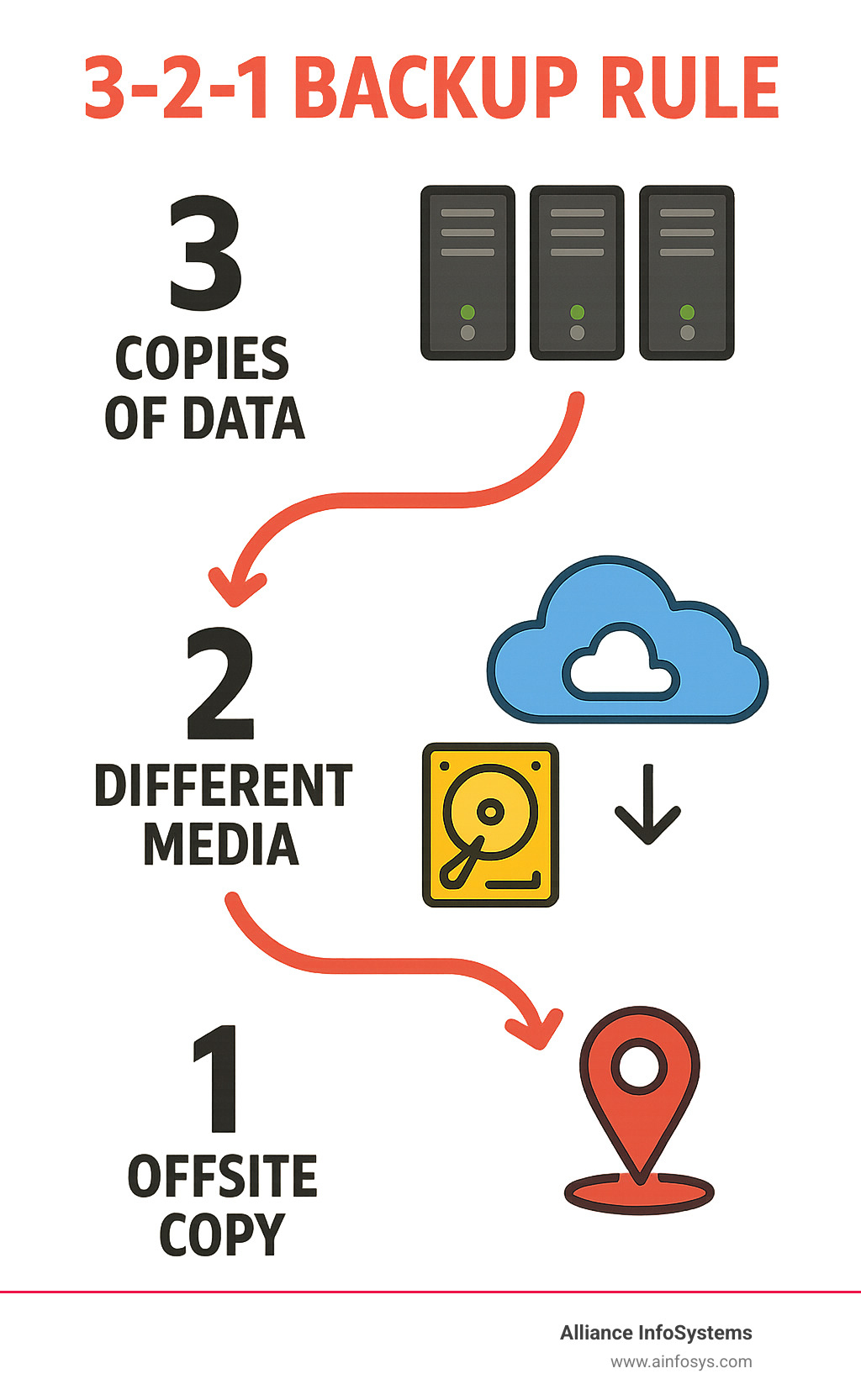
- Follow the 3-2-1 Rule – Keep 3 copies of data, on 2 different media types, with 1 copy offsite
- Automate Everything – Use cron jobs and scripts to eliminate human error
- Test Restores Regularly – Verify backups work before you need them
- Encrypt Your Data – Protect backups both at rest and in transit
- Document Your Process – Ensure others can restore when you’re not available
- Monitor Backup Jobs – Set up alerts for failed backups
- Separate Critical Assets – Prioritize
/etc,/home,/var, and application data
The stakes are high. Data loss from human error is common, and ransomware attacks are on the rise. With Linux powering over a million organizations, these servers are prime targets.
Without proper backups, a single failure can destroy years of data in minutes. Many SMBs struggle with complex solutions that leave them vulnerable.
As one experienced system administrator put it: “You’ll never be fired for having too many good copies of your company’s data.” This guide shows you how to build that protection efficiently.
The Foundation: Crafting a Bulletproof Linux Backup Strategy
A server crash and complete data loss is a nightmare scenario. This is why Linux server backup best practices are more than technical guidelines—they’re a business lifeline.
At Alliance InfoSystems, we help clients build strategies that work when disaster strikes. Data loss is a matter of “when,” not “if,” due to hardware failure, human error, and sophisticated ransomware. A solid backup strategy is your ultimate safety net.
A great backup strategy starts with asset identification. Map out critical data, from configurations in /etc to user files in /home and logs in /var. Understanding how often data changes helps create smart backup schedules.
Next, define scheduling and retention policies. How often to back up and how long to keep them depends on business needs. An e-commerce site might need hourly backups, while an office server may only need daily ones. A typical mix includes daily, weekly, and monthly backups for different purposes.
The professional standard is the 3-2-1 Rule: Keep 3 copies of your data on 2 different media types, with 1 copy offsite. This simple principle creates multiple layers of protection against disaster.
For storage destinations, local storage offers fast recovery for minor incidents. A Network Attached Storage (NAS) device provides centralized local backups and counts as a separate media type.
Cloud Computing is ideal for offsite storage, offering scalability and redundancy that’s difficult to achieve in-house. It protects data from site-wide disasters like fires, floods, or theft.
Understanding Backup Types: Full, Incremental, and Differential
Understanding when to use each backup type is crucial for an efficient Linux server backup best practices strategy.
Full backups are complete copies of all selected data. They offer the simplest restoration but consume the most storage and time. They are typically run weekly or monthly to create a baseline.
Incremental backups only capture data that has changed since the last backup, making them fast and storage-efficient. However, restoration is complex, requiring the last full backup and all subsequent incremental backups in order.
Differential backups copy everything that has changed since the last full backup. Restoration is simpler than with incrementals (requiring only the full and the latest differential), but they use more storage over time.
Mirror backups are exact replicas of the source data, with changes mirrored immediately. They provide no version history, so data corruption or deletion is instantly replicated to the backup.
Snapshot-based backups capture a system’s state at a point in time using filesystem features (LVM, Btrfs, ZFS). They are nearly instant, space-efficient, and ideal for virtual machines and databases.
A successful strategy often combines types, such as weekly full backups with daily differentials, to balance storage, speed, and recovery simplicity.
| Backup Type | Speed of Backup | Storage Usage | Restore Complexity |
|---|---|---|---|
| Full | Slowest | Highest | Lowest |
| Incremental | Fastest | Lowest | Highest |
| Differential | Medium | Medium | Medium |
| Mirror | Fast | High | Lowest |
| Snapshot | Instantaneous | Low (initially) | Low |
Key Restore Metrics: RTO and RPO
Defining your Recovery Time Objective (RTO) and Recovery Point Objective (RPO) is the foundation of any solid Disaster Recovery & Business Continuity Plan.
RTO answers: “How long can we afford to be down?” It’s your maximum acceptable downtime. A low RTO (minutes) requires more advanced recovery technology than a high RTO (days).
RPO answers: “How much data can we afford to lose?” This determines your backup frequency. A low RPO (minutes) requires frequent backups, while a higher RPO might only require daily backups.
These objectives must reflect business impact. Critical systems need low RTO and RPO, while less critical data can have more relaxed targets. Clear RTO and RPO targets guide every backup decision, ensuring your strategy serves real business needs.
Building Your Strategy: Core Linux Server Backup Best Practices
The core of an effective strategy is automation. Automating backups eliminates the biggest risk: human error. It prevents forgotten backups and mistakes made during a crisis. Automated backups ensure consistency and reliability, which is the hallmark of professional IT operations.
As experts at Red Hat note in their 5 Linux backup and restore tips from the trenches, practical implementation is key. We focus on automation and documentation to create a reliable system that anyone on your team can use for restoration.
Manual Methods and Automation with Native Tools
Linux includes powerful, battle-tested native commands. Their real strength is realized through automation with cron jobs and shell scripting.
The cp command is the simplest tool for copying files but lacks features for a full backup strategy.
tar (tape archiver) bundles files into a single archive (.tar.gz), preserving permissions and ownership. It’s ideal for backing up configuration directories like /etc. For example, tar -cvpzf /backup/system.tar.gz /etc /home archives key directories.
rsync excels at efficient, incremental transfers by copying only changed file portions. This makes it ideal for network backups of large datasets. The command rsync -aAvz --delete /source/ /destination/ creates an efficient mirror of a directory.
Cron jobs automate everything by scheduling your backup scripts to run at specific times, such as daily at 3 AM when system load is low.
Strategically combining these tools provides a flexible and cost-effective Data Backup solution. For example, use rsync for daily data backups, tar for weekly configuration archives, and cron to automate the schedule, with a final rsync to an offsite location.
Open-Source and Enterprise-Grade Solutions
While native tools are flexible, larger organizations may need comprehensive solutions with centralized management, which fall into two categories: open-source and enterprise-grade.
Open-source backup tools are popular and powerful, often including advanced features like deduplication, compression, and encryption that can significantly reduce storage needs. Benefits include cost savings and customization flexibility, supported by an active community. The main drawback is the need for in-house technical expertise and the lack of dedicated support.
Enterprise-grade backup solutions are designed for large-scale environments, offering centralized management and application-aware backups for complex systems like databases, ensuring data consistency. They also provide robust reporting for compliance audits and come with dedicated support teams and service level agreements (SLAs). The trade-offs are higher costs from licensing and maintenance, potential vendor lock-in, and infrastructure complexity.
The right choice depends on your organization’s size, budget, and technical expertise. Alliance InfoSystems can help you evaluate these options to find the right balance for your needs.
Advanced Tactics: Security, Containers, and Verification
Advanced linux server backup best practices add layers of security, strategies for modern environments like containers, and rigorous verification to ensure secure, reliable recovery.

Effective log monitoring is an early warning system. Reviewing logs helps spot failed jobs or security issues before they become disasters. This proactive approach is a key part of our Managed Security services.
Securing Your Data: Linux server backup best practices for encryption and access
An unencrypted backup is a major security risk. If compromised, all your sensitive data is exposed. Securing backups is as critical as creating them.
Encryption at rest is your first line of defense. All backup data should be encrypted (e.g., with AES-256) before being written to storage. This makes the data unreadable to unauthorized users.
Encryption in transit protects data as it travels over a network. Use secure protocols like SSH to create an encrypted tunnel for backup traffic.
Access control is crucial. Limit access to backup systems to authorized personnel using strong passwords, MFA, and the principle of least privilege.
Proper key management is vital. Store encryption keys separately from the data, rotate them regularly, and audit all access.
Immutable backups offer the ultimate protection against ransomware. This write-once, read-many data cannot be altered or deleted for a set period, keeping it safe from attack. This is one of the Top 10 Cyber Security Practices we advocate.
Backing Up Modern Environments: Docker and Kubernetes
The rise of containers has changed application deployment and requires a new approach to linux server backup best practices. Since containers are ephemeral, the focus must be on persistent data.
The container itself isn’t the backup target; the data it uses is. Valuable data resides in Docker volumes and Kubernetes persistent volumes. These must be the focus of your backup strategy, as emphasized by the Official Docker documentation on volumes.
Also, back up your configuration files (Dockerfile, docker-compose.yml, Kubernetes YAML). Storing these blueprints in a version control system like Git is a best practice.
In Kubernetes, the etcd database, which stores the entire cluster state, is a critical backup component. Backing up Persistent Volumes in Kubernetes often involves integrating with storage provider snapshot features or using Kubernetes-native backup tools.
Our Cloud Virtualization Services expertise ensures your containerized workloads are protected, whether on-premises or in the cloud.
The Final Check: Testing and Verifying Your Backups
Regular testing and verification are what separate professional strategies from amateur ones. An untested backup is unreliable.
Restore testing means simulating a disaster. Perform test restores of files, databases, or entire systems to a separate environment to verify that applications function correctly.
Data verification uses automated checks like checksums after a backup completes to catch silent data corruption early.
Automated checks should be part of your workflow to monitor logs, verify file sizes, and check destination accessibility, alerting you to any issues.
The importance of regular testing is paramount. It reveals configuration flaws, media problems, and procedural gaps before a real disaster occurs.
Documenting procedures is the final step. Detailed documentation of the strategy, storage locations, and restoration steps ensures that anyone on your team can perform a recovery.
Frequently Asked Questions about Linux Server Backups
With over 20 years in business, we’ve seen the same questions about linux server backup best practices arise repeatedly. Here are answers to the most common concerns.
How do backup strategies differ for personal computers versus enterprise servers?
The core principle is the same, but the scale and complexity differ dramatically.
- Scope: Personal backups cover documents and photos. Enterprise backups protect massive databases, complex application configurations, and systems supporting hundreds of users.
- Complexity: Personal backups use simple tools. Enterprise backups require sophisticated scripting, integration with virtualization, and application-aware tools for databases.
- Automation level: Enterprise backups demand robust automation with logging and alerts, leaving no room for human error.
- RTO/RPO requirements: Personal downtime is an inconvenience. Enterprise downtime costs money, demanding recovery times measured in minutes, not days.
- Compliance needs: Enterprises often face strict regulatory requirements like HIPAA or GDPR, which dictate backup and data protection policies.
What are the critical components of a Linux system to back up?
A common mistake is backing up too much or too little. Focusing on the following critical components is key for efficient recovery.
- The
/etcdirectory: This holds all system configuration files. Losing it means a manual, time-consuming server rebuild. - User data in
/home: This contains irreplaceable user files, documents, and custom scripts. - The
/vardirectory: This contains variable data like logs, mail spools, and web server content. Application data within/varis often critical. - Application data: This data can be scattered across the filesystem. It’s crucial to inventory and back up all locations where custom applications store data.
- Database dumps: Never just copy live database files. Use database-native tools like
mysqldumporpg_dumpto create a consistent, usable backup file. - Package list: Back up a list of installed packages (e.g., via
dpkg --get-selectionsorrpm -qa). This dramatically speeds up server rebuilds.
What are common pitfalls and linux server backup best practices to avoid them?
Most backup disasters are preventable. Here are common pitfalls and how to avoid them.
- Not testing restores: This is the most common failure. An untested backup is not a reliable backup. Regularly perform test restores to ensure your data is recoverable.
- Storing backups with the source: This leaves you vulnerable to site-wide disasters like fire or ransomware. Always follow the 3-2-1 rule and keep an offsite copy.
- Forgetting encryption: Unencrypted backups are a huge security risk. Encrypt data both at rest and in transit, and have a solid plan for managing the encryption keys.
- No offsite copy: Without an offsite copy, you are not protected from local disasters. Cloud storage provides an easy and affordable offsite solution.
- Ignoring logs: Silent failures are common. Monitor backup logs and set up alerts for failures to catch problems before they become catastrophes.
- Lack of documentation: If the primary admin is unavailable, a lack of documentation can make recovery impossible. Document every aspect of your backup and restore procedures.
Conclusion
A bulletproof backup strategy for your Linux servers is more than an IT task—it’s a core business protection. We’ve covered the essentials, from why linux server backup best practices matter to implementing the rock-solid 3-2-1 rule for data safety.
Your backups are an insurance policy for your digital assets. We’ve reviewed backup types, from full to incremental, and the key metrics of RTO and RPO that align recovery plans with business needs.

Linux offers flexibility with native tools like tar and rsync, while comprehensive open-source or enterprise solutions can manage more complex environments.
Security is not an afterthought. Encrypting backups and managing access is essential, as is having a specific strategy for modern environments like Docker and Kubernetes.
The most critical lesson is that testing your backups regularly is non-negotiable. An untested backup is unreliable, a fact many businesses learn only after a disaster.
For over 20 years, Alliance InfoSystems has helped Maryland businesses steer these challenges. We understand that every organization is unique, and we build custom solutions that fit your specific needs.
Threats are constant, but a solid backup strategy—automated, tested, and secure—ensures your business can weather any storm.
Don’t wait for a disaster to find gaps in your protection. Let our team help you implement the linux server backup best practices to keep your business safe and running smoothly.
Get professional help with your Data Backup & Recovery strategy